A serverless messenger: team chat straight between devices
A serverless messenger delivers messages without a provider storing them in between or managing accounts. The devices find each other and sync whatever is missing. Dialog does this for teams: no central message server, no account, end-to-end encryption and, if you like, translation as you read.
What it does
- No message server
- Devices find each other via the Mainline DHT and connect directly, or through relays otherwise. The public relays can be switched off and your own added.
- No account
- Your identity is a key on your device. Invitations go out as text or a QR code, and an admin lets new members in.
- End-to-end encrypted
- Olm and Megolm via vodozemac. Every message is signed by its sender and checked before it’s applied.
- An anchor for when people are offline
- A team device that is always on can hold rooms, encrypted, and pass them on. It can’t read them, and it’s optional.
- Translation as you read
- DeepL with your own key, a team glossary, and the original one click away.
- What a team chat needs
- Threads, replies, reactions, mentions, search across rooms, several admins, several devices per person and files up to 25 MB.
How a messenger without a server works
With most messengers, every message goes through the provider’s servers. The provider delivers, stores messages for people who are offline and manages the accounts. If the service goes down or locks an account, the conversation is gone.
A messenger without a server hands these jobs to the devices themselves. They find each other through an open directory, a distributed hash table, and set up a direct connection. If routers or firewalls get in the way, a relay helps by passing on the encrypted data. Every device keeps a copy of the conversation, and when they reconnect, the devices sync whatever is missing.
That changes who knows what. Nobody holds content and contact lists centrally. In return, the devices themselves have to do a server’s work: keep copies, check members, and catch up anyone who missed something.
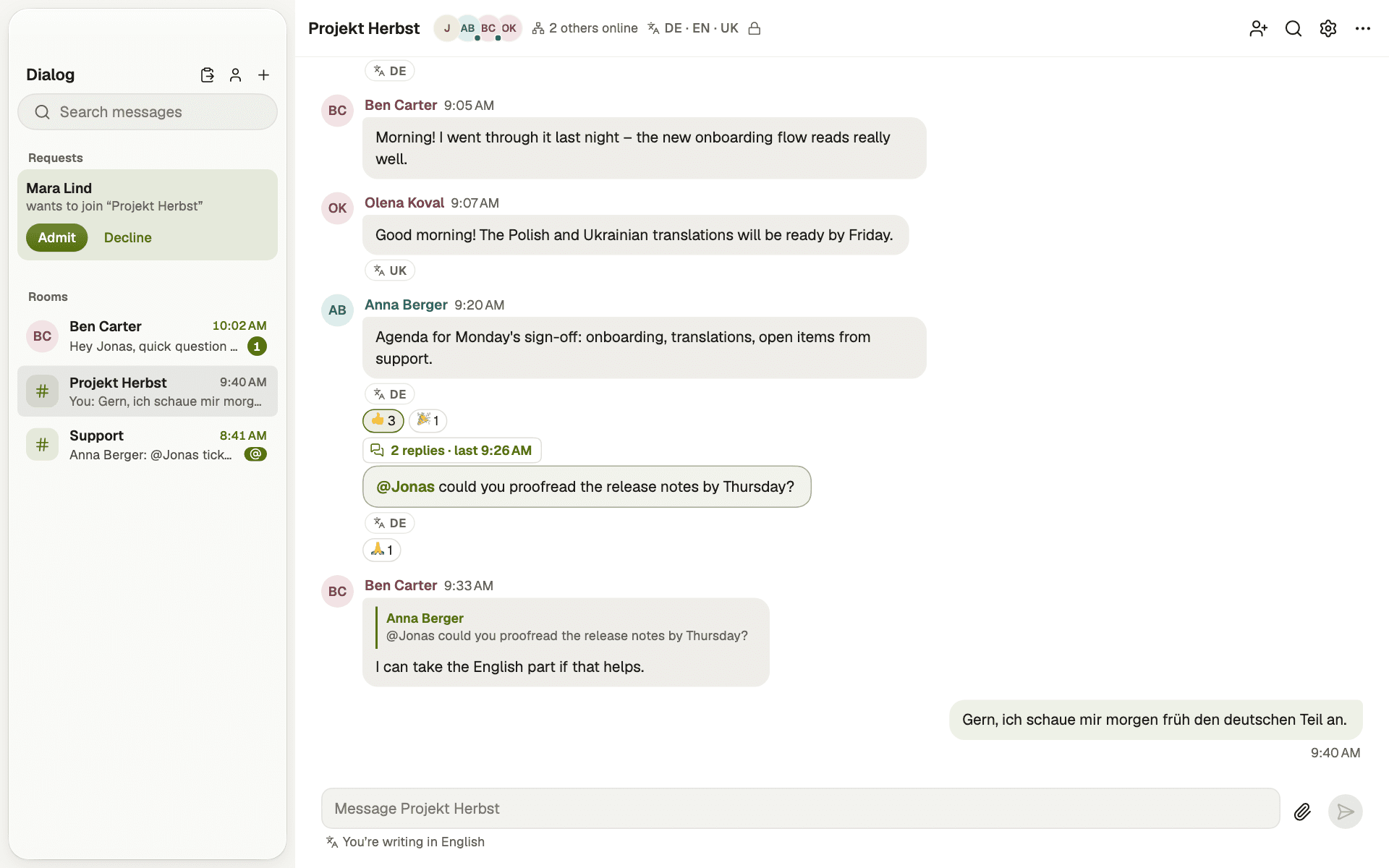
Central, federated, peer-to-peer
Roughly, there are three designs. With central services, one provider runs all the servers. Federated networks such as Matrix spread rooms across many servers; a room lives as long as one participating server runs, but every account is tied to one particular server. If it goes down, that person is locked out.
Peer-to-peer messengers manage without such servers. Briar, for example, describes syncing messages directly between devices over Tor, Bluetooth or Wi-Fi. Dialog belongs to this group but is cut out for office teams: closed rooms with admins, translation and files rather than anonymous communication under difficult conditions.
What Dialog uses for this
Dialog builds on Iroh, an open-source networking library. Each device is an endpoint whose address is its public key, and connections run over QUIC with TLS. Discovery uses the Mainline DHT, which BitTorrent also uses. Devices connect directly via hole punching, or through relays otherwise. According to Iroh’s documentation, relays can’t read the traffic because it’s end-to-end encrypted.
A room is a shared document (Loro, a CRDT) that every member’s device holds in full. Content is encrypted with a Megolm group key before it’s added, and every entry is signed by its sender and checked before it’s accepted. When someone is removed, all remaining devices get a new key; whatever the removed device already had stays with it.
Besides live distribution, every device syncs its rooms with the members every 15 seconds. That way, anything left behind by a restart or a dropped connection still arrives.
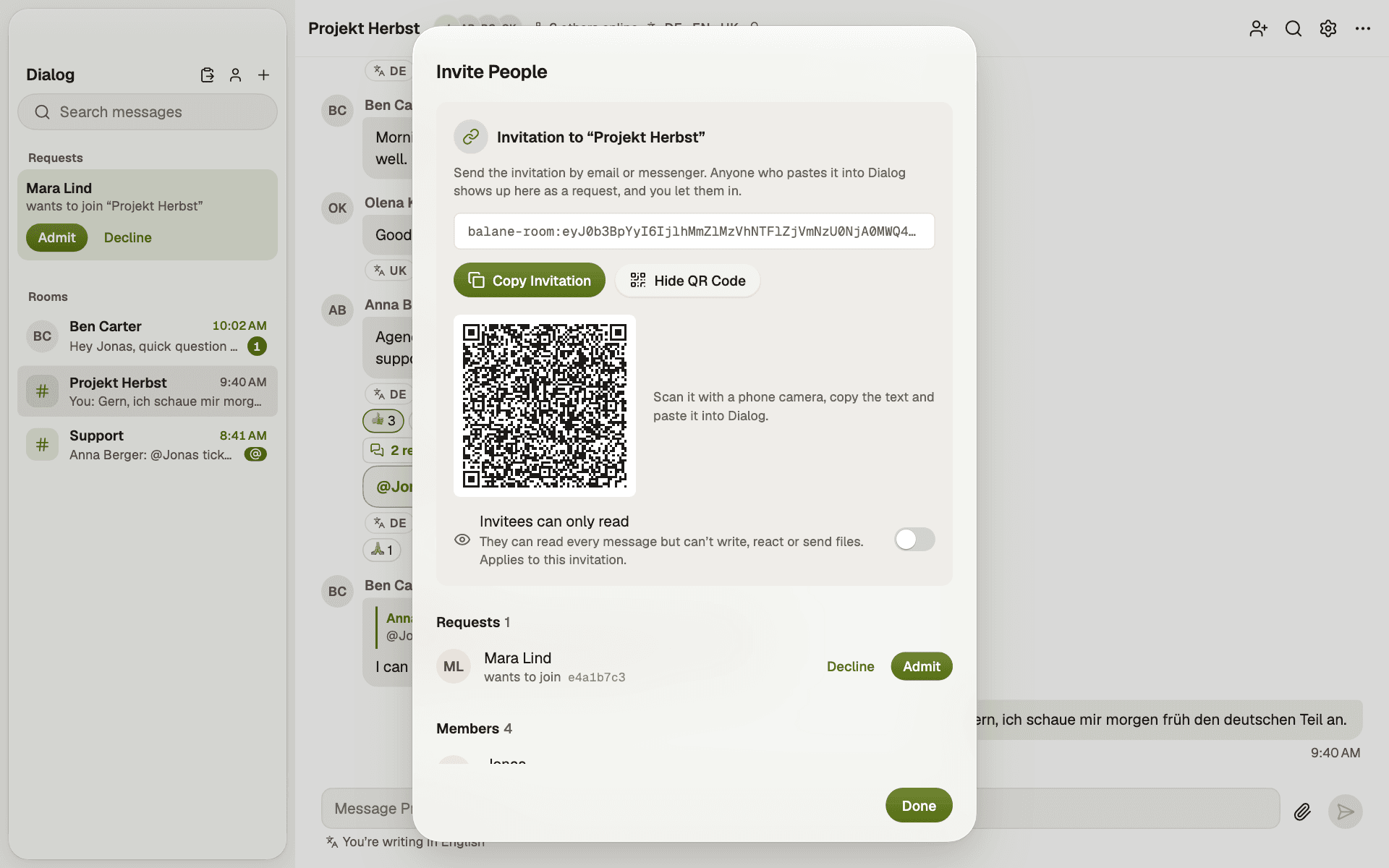
No account: invitation and admission
Instead of a phone number or email address, there’s an invitation. It’s a text starting with “balane-room:” and can be shown as a QR code. It contains the room, the admin’s key and the admin’s device. The invitation may travel by email or another messenger; Dialog recognises it even with line breaks, quote marks and a greeting around it.
Whoever pastes it sends a request. It shows up for the admin in the sidebar and in the “Invite People” sheet; only “Admit” adds the device. The admin needs to be online for that. An invitation can be read-only if you like, and one-to-one conversations use an invitation with a one-time code that expires after its first use.
What’s different without a server
Without a server, someone has to be online for a message to arrive: sender and recipient at the same time, a third member or an anchor. Below your latest message you therefore see “delivered to 2 of 4”, “delivered to everyone” or “not delivered yet, goes out once someone is online”. The header shows how many others are online right now.
An anchor closes that gap: a team Mac mini, NAS or Raspberry Pi that is always on, holds encrypted changes and passes them to devices that come online later. “Set Up Anchor…” takes you there in three steps. There’s no ready-made download yet; the anchor is built from source.
Balane Office uses Dialog’s network and encryption for co-editing in Documents, Sheets and Slides as well.
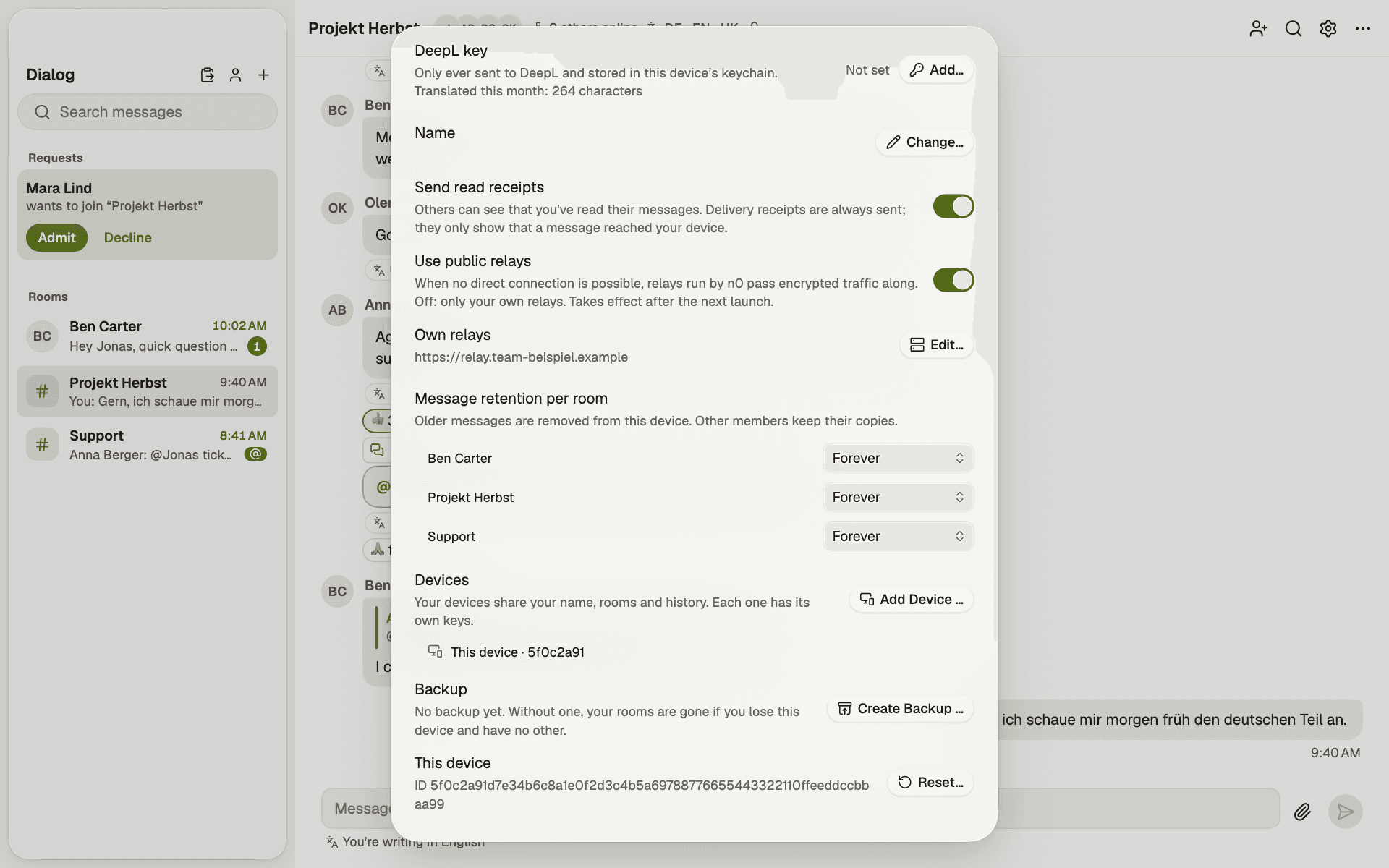
Relays: public and your own
If no direct connection is possible, relays step in. The public relays of n0, the company behind Iroh, are preset. In settings you can turn them off with “Use public relays”. Under “Own relays”, “Edit…” lets you enter as many addresses as you like, such as a relay your team runs itself; the software for it is open source. Both take effect after the next launch.
Relays and DHT nodes see no content, but they do see connection data such as IP addresses and times. If you want to avoid that, turn off the public relays and run your own.
Notifications on phones
iPhone and Android pause apps in the background. Notifications there only go through Apple’s and Google’s push services, which need a service holding the app’s credentials. Dialog has a wake service for this. It’s optional and off by default. The wake service and the push services learn device tokens, times and a derived room ID, but no message content.
Without notifications, Dialog syncs when you open it. That’s the honest limit of “serverless”: if you want instant notifications on a phone, you need a small central service that reads nothing.
Common misconceptions
“Serverless” doesn’t mean anonymous. Peers, relays and DHT nodes can see who is connected to whom from the IP addresses. Nor does it mean nothing can be deleted: a retracted message disappears on every device that syncs, but anyone who already read or copied it keeps it.
And it doesn’t mean nothing depends on outsiders any more. App stores, Apple’s and Google’s push services, the DHT’s known bootstrap nodes and the preset relays remain dependencies, and network operators can block connections.
How it works
Choose a name
At first launch, just enter a name under “Your name” and choose “Continue”; there is no account. On the Mac, the firewall then asks about incoming connections, which you should allow.
Create a room
“New room” in the sidebar or ⌘N, set the name and translation rule, then “Create”.
Invite people
In the “Invite People” sheet, choose “Copy Invitation” or “Show QR Code”. If the person should only read along, turn on “Invitees can only read”.
Paste the invitation
The other person chooses “Paste Invitation…” and pastes the text, even straight from an email. Below the field it says “Invitation recognized”.
Admit
The request shows up for the admin under “Requests”; “Admit” adds the device. From then on, the new person can write.
Optional: anchor and relays
“Set Up Anchor…” for a device that’s always on. In settings, turn off “Use public relays” and add your own addresses under “Own relays” with “Edit…”.
At a glance
- Network
- Iroh, Mainline DHT, relays
- Room data
- one Loro document per room, on every device
- Encryption
- Olm and Megolm (vodozemac)
- Sync
- live, plus every 15 s
- Files
- up to 25 MB
- Translation
- DeepL with your own key
Limits
What the feature can’t do yet, or what hasn’t been tested.
- Built and tested, but not in a released version yet. So far checked only on the Mac; tests across separate networks and on Windows, iPhone and Android are still to come. The network tests run over loopback without relays or the DHT; one check over the internet was done with a single computer.
- On the Mac, loading can get stuck at the keychain on launch. The cause hasn’t been found yet; the app now shows a message with “Try again”.
- Without an anchor, a message only arrives when sender and recipient, or a third member, are online at the same time. There’s no downloadable anchor program yet; it’s built for macOS, while Linux and Docker are described but not built.
- Notifications on iPhone and Android need the optional wake service and Apple’s or Google’s push services.
- There are no calls.
Frequently asked questions
How do messages arrive if the recipient is offline?
Through another member who is online, or through an anchor: a team device that is always on and holds rooms, encrypted. Otherwise the message goes out once both are online; until then it says “not delivered yet” below it.
Who can read along?
Only the room’s members. Relays and anchors only pass on encrypted data, though relays and DHT nodes do see connection data such as IP addresses and times.
Do I need a phone number or email address?
No. Your identity is a key on your device plus a name of your choice. Email is at most a way to send an invitation.
What happens if I lose my device?
Without a backup, the rooms on that device are gone; the other members keep their copies. “Create Backup…” makes a sealed file with a recovery key, and further devices of your own can be linked with a pairing code.
Can I run my own relay?
Yes. Iroh relays are open source and can be self-hosted. Enter the address in settings under “Own relays” and turn off the public relays if you like.
Can I make calls with Dialog?
No. Dialog is a text chat with files; there are no calls.
When will Dialog be available, and what does it cost?
Dialog is built and being tested, but not released yet; there’s no date. The app will be free. Translation needs your own DeepL key; without one, the chat works without translation.
Balane Office is a long-running experiment: nine office apps, mostly built with AI. The apps are free and save to your own device. About the experiment →