Open an EML file without importing it into a mailbox
An EML file is a single saved email. Almost every mail app can open one, but often only by dragging it into an account. Mail shows it in a preview of its own: headers, text and attachments, with no account, no network fetch, and remote images and links blocked.
What it does
- Preview without import
- The file is read and displayed, but not written to the local store. Nothing is fetched from a mail server.
- Remote content blocked
- Remote images and links are always blocked in the preview, even if your account normally loads images. Detected tracking pixels are removed and counted.
- Attachments with safeguards
- Attachments go through the same safeguards as in your mailbox: Mail never opens executable files or names with a disguised extension directly, it only saves them after a warning.
- Limits against crafted files
- Files up to 4 MiB, headers up to 64 KiB, no more than 128 header fields and a capped number of MIME parts. Damaged headers, a missing sender or an unreadable date lead to a clear message.
- Open from the file manager
- Mail is declared to macOS, Windows and Android as a viewer for .eml files and shows them in the same preview.
What an EML file is
An EML file holds exactly one email in the internet mail format, just as it travels between mail servers. The structure is defined in RFC 5322: headers at the top with sender (From), recipients (To, Cc), date, subject and a unique Message-ID, then the content after a blank line.
MIME (RFC 2045 and 2046) splits the content into parts: text as plain text and often also as HTML, images and attachments as Base64-encoded blocks. The media type for such a file is message/rfc822. Since everything is made of text characters, any text editor opens an EML file. It only becomes readable in a program that splits the MIME parts and decodes them.
EML files are saved for an archive, as evidence in a case file, when exporting from ticket systems, or to pass a suspicious message with all its headers to an IT team. Mail itself saves any message unchanged with “Save Original as EML…”. The local preview is the way back.
Opening EML files in Outlook and Thunderbird
In new Outlook for Windows and Outlook on the web, Microsoft says to drag an .eml file from File Explorer onto the reading pane. Alternatively, right-click, choose “Open with” and “Outlook (new)”. Double-clicking only works if Outlook is set as the default app for the extension in Windows. For .msg and .oft files, Microsoft requires a qualifying Microsoft 365 subscription there, but not for .eml.
In Thunderbird, answers in Mozilla’s support forum point to File, Open, “Saved Message…”. The message is then read, but not added to a folder. To send it again, use “Edit As New”. Thunderbird doesn’t open Outlook’s .msg files directly.
What the big apps have in common is that they show an EML file with the same settings as any other message. If you load remote images by default there, they also load when you open a file from someone else.
Common mistakes with EML files from elsewhere
The most common one: dragging the file into a mailbox just to read it. A foreign, possibly crafted message then sits in the account for good, gets synced and shows up in searches. Loading remote images is just as common. A forwarded message can contain tracking pixels that tell the original sender it’s being opened right now.
Opening attachments straight away with a double-click is risky with EML files from unknown sources: invisible control characters can hide an executable behind “Invoice.pdf”. Finally, people often rename an Outlook .msg file to .eml. That changes nothing about the content, and the binary format stays unreadable for EML viewers.
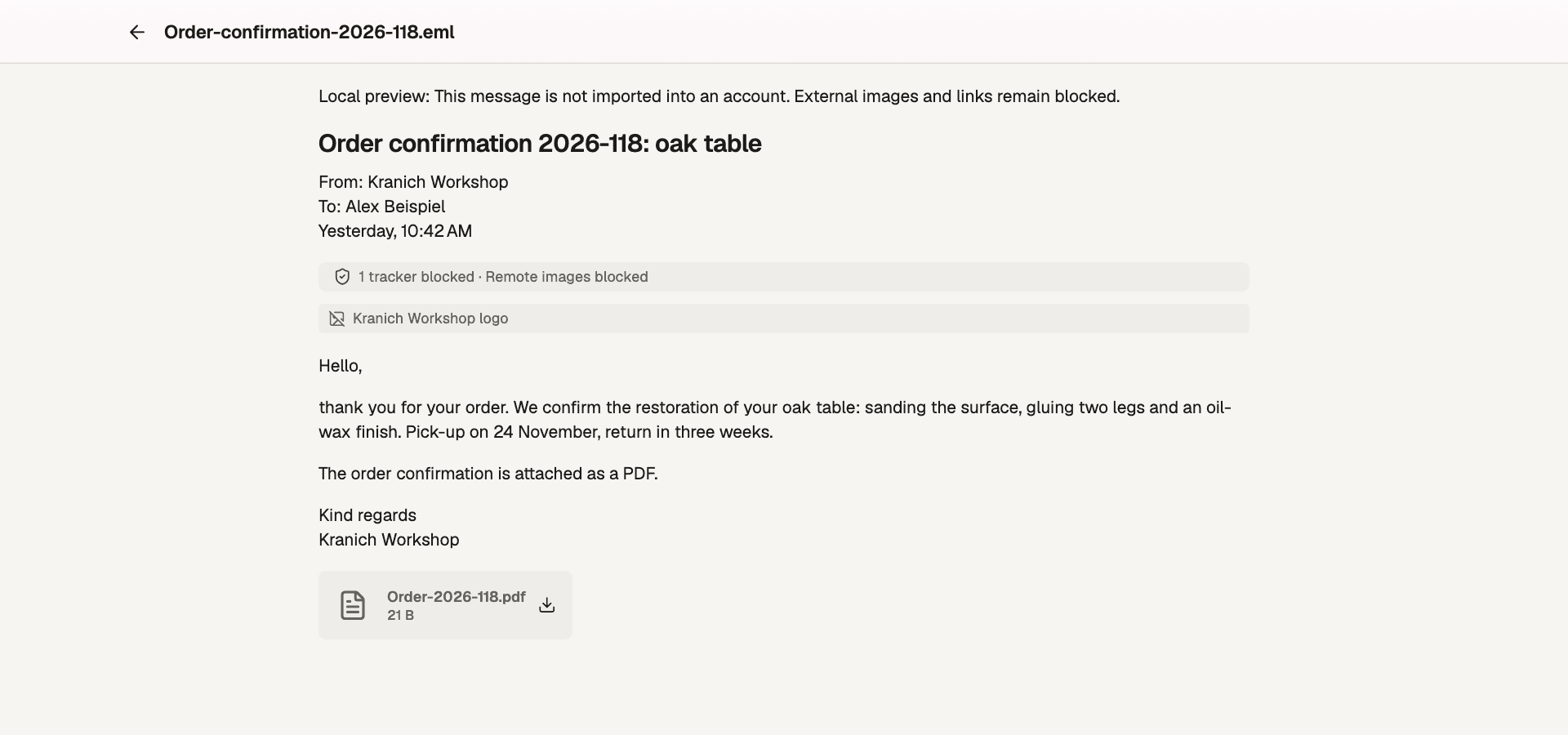
How Mail shows an EML file
The preview opens as a page of its own with the file name in the title bar. At the very top is the note that the message isn’t added to an account and that remote images and links stay blocked. Below come subject, sender, recipients and date, then the text.
HTML goes through the same clean-up as in the mailbox: no scripts, no forms, no stylesheets. Detected tracking pixels disappear, remote images are replaced by a placeholder with their alt text, and a line such as “1 tracker blocked · Remote images blocked” sums it up. There is deliberately no button to load them here. Links don’t respond to clicks.
Attachments appear as cards with name and size. Saving them uses the usual attachment safeguards. The arrow at the top left takes you back to the mailbox, and nothing of the message stays stored in Mail.
The command in Mail
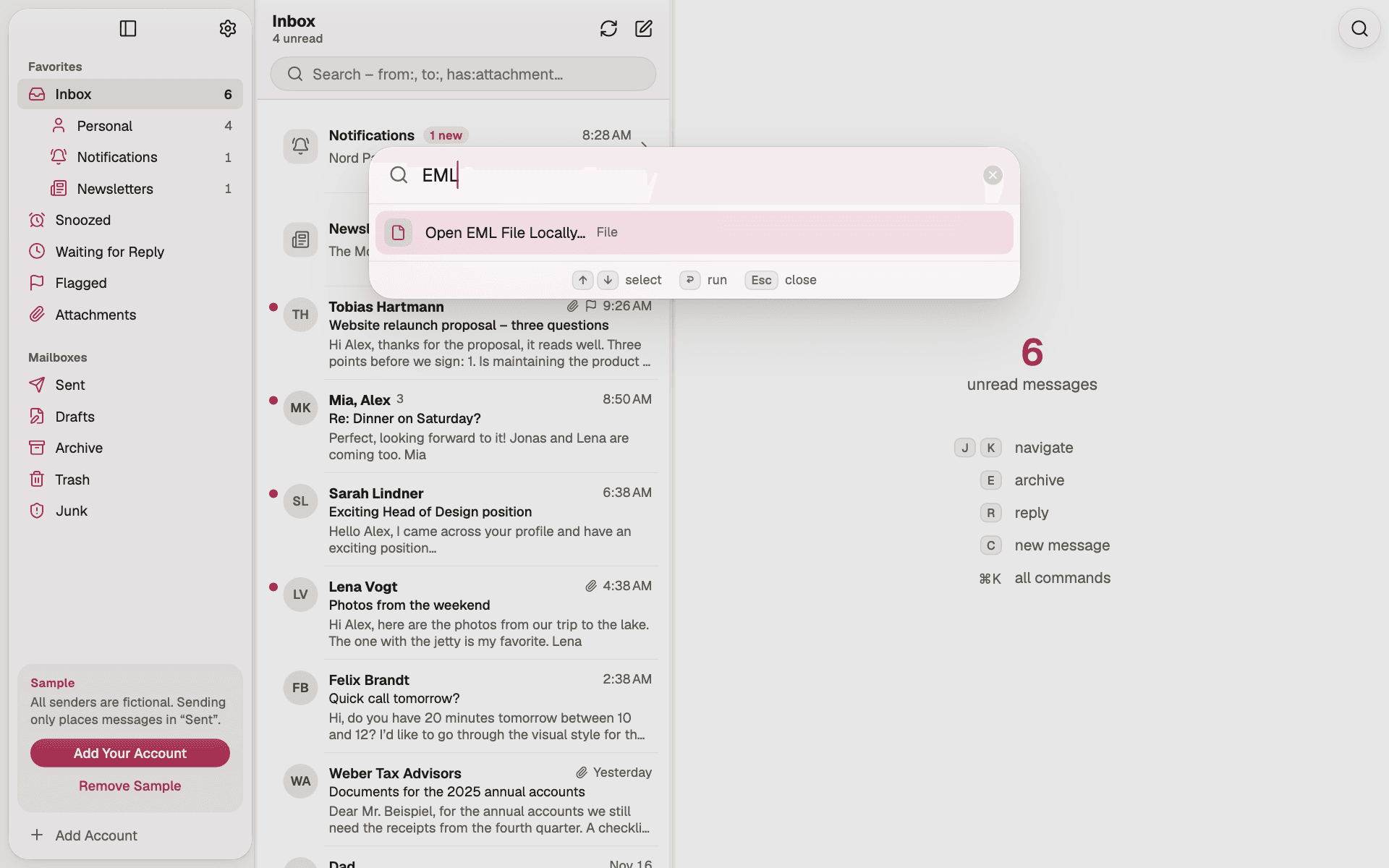
“Open EML File Locally…” is one of the file commands and can be reached through the command search: the magnifier at the top right or ⌘K, then type “EML”. The file dialog only offers files ending in .eml. If the file is in Finder or File Explorer, Mail also opens it straight from the system in the same preview, provided the operating system hands the file to Mail.
Without an account of your own, you can try everything with the sample mailbox. It only contains made-up senders, and sending just places messages in “Sent”.
EML, MSG and winmail.dat
Besides EML, some programs use formats of their own. Outlook on Windows often saves messages as .msg, a binary format Microsoft documents as [MS-OXMSG]. Attachments called winmail.dat come from TNEF ([MS-OXTNEF]), which Outlook uses to bundle formatting and attachments.
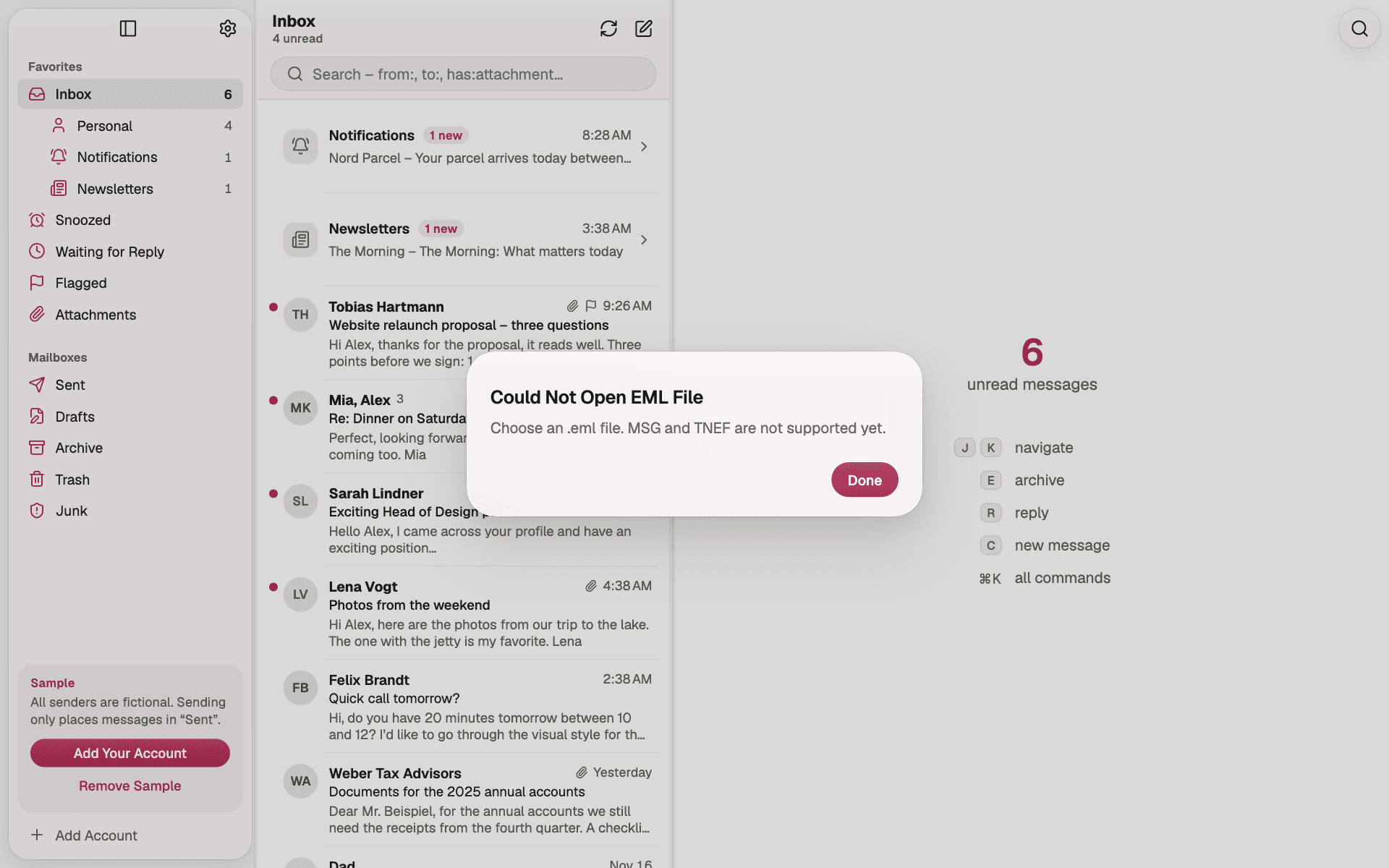
Mail doesn’t read either format yet. No parser with a vetted licence, security limits and test files has been chosen for them. A .msg file therefore gets the message “Choose an .eml file. MSG and TNEF are not supported yet.” instead of being misread as EML. If you receive one, asking for the message to be forwarded often helps.
How it works
Open Mail
The command lives in the main window. Without an account of your own, you get there via “Try a Sample Mailbox First”.
Run the command
Open the command search with the magnifier at the top right or ⌘K, type “EML” and choose “Open EML File Locally…”. The command is also in the menu bar.
Pick the file
Pick the .eml file in the file dialog. Files over 4 MiB, other extensions and damaged files end with the message “Could Not Open EML File” and a reason.
Read the message
The preview shows subject, “From:”, “To:”, date, text and attachments. The grey line above the text lists blocked trackers and images.
Save an attachment if needed
Choose the save icon on the attachment card. For executable or disguised file names, Mail asks first; the file is only saved with “Save Anyway…”.
Close the preview
Use the arrow at the top left to go back. The mailbox stays unchanged.
At a glance
- Format
- .eml (RFC 5322, MIME)
- File size
- up to 4 MiB
- Headers
- up to 64 KiB, 8 KiB per line, 128 fields
- Not yet
- .msg, TNEF (winmail.dat)
- Network
- no fetch, images and links blocked
Limits
What the feature can’t do yet, or what hasn’t been tested.
- Built and tested, but not in a released version yet. The real file picker and opening by double-click from Finder, File Explorer or Android’s file manager haven’t been tried on devices yet; what’s covered is the file type declaration and widget tests.
- .msg files from Outlook and TNEF attachments (winmail.dat) aren’t read.
- Files over 4 MiB are rejected. The MIME reader is lenient with some faulty parts; a complete rendering of every message from elsewhere isn’t guaranteed.
- From the preview, the message can’t be added to an account, replied to or forwarded, and remote images can’t be loaded.
- Actually opening links and attachments from the preview is only backed by a code review of the safeguards, not by an automated test.
Frequently asked questions
How do I open an EML file without Outlook?
Any mail app that understands MIME can do it, for example Thunderbird via “Saved Message…”. In Mail, use “Open EML File Locally…” and the message never enters an account. A text editor only shows the raw text with encoded parts.
Can I open .msg files from Outlook?
Not yet. Mail recognises a .msg file and tells you the format isn’t supported. Renaming it to .eml doesn’t help, since the binary format stays the same.
Do I need an email account for this?
The preview only reads the file. The command is in the main window, which appears once you set up an account or open the sample mailbox.
Is it risky to open an EML file from someone else?
An EML file can contain links, tracking pixels and attachments. Mail runs no scripts, blocks remote content and won’t open executable attachments directly. That doesn’t replace a virus scanner.
Why are images missing in the preview?
Loading remote images would contact the sender’s server. In the preview they therefore stay blocked and appear as placeholders with their alt text. Images embedded in the file itself are shown.
How large can the file be?
Up to 4 MiB. Mail rejects larger files before reading them, even if the file keeps growing while it’s being read.
When will the feature be available, and what does it cost?
It’s built and tested and ships with the next released version of Mail; there’s no date yet. Like all of Balane Office, Mail is free.
Balane Office is a long-running experiment: nine office apps, mostly built with AI. The apps are free and save to your own device. About the experiment →