Client content approval with no account and no extra tool
Before a post goes live, you often need the client’s go-ahead. This page explains what a good approval records, how it usually works and where it gets stuck. The Content Planner will soon add a route that needs no client account: you export posts as an HTML page, the client decides in a browser and saves a response file, and the app applies only what matches the current state. The return path is built and tested, but not in a released version yet.
What it does
- Everything on one page
- Text, media and date for each post, up to 32 posts per review.
- Clear answers
- For each post, “Approved” or “Changes needed”, plus notes of up to 4,000 characters. A comment without a decision counts as “Comment only”.
- Offline in the browser
- The page loads no third-party scripts and has no network function; its Content Security Policy blocks connections. The answer is saved locally as a file.
- Checked before applying
- The preview separates matching posts, posts changed since export, foreign requests, answers already applied and conflicts. Only what you select is applied.
- Change requests go back to draft
- If the client asks for changes, a post marked ready or scheduled goes back to draft.
- No double import
- A marker in the post prevents the same answer from being applied twice.
How client approvals often work
Agencies and freelancers need the client’s go-ahead before posting. Often that happens through screenshots by email, an annotated PDF or chat messages. In the end it’s unclear which version was approved and which comment belongs to which post.
Approval tools solve this with a client login. That means another account for the client, another password, and the drafts sit with yet another service. With smaller clients who only sign off a plan once a month, approval then stalls on a forgotten login.
What an approval should record
An approval is only worth as much as what it refers to. It should say clearly which post in which version is meant, including text, media and date. Then comes the decision itself, approved or changes needed, a comment, who decided and when.
Just as important is what happens after approval. If a post is changed afterwards, the old approval no longer covers the new text. A good process notices and asks again instead of quietly carrying the approval over. That’s what the Content Planner’s return path is built for: on import, it compares the text with the version at export.
Exporting for review
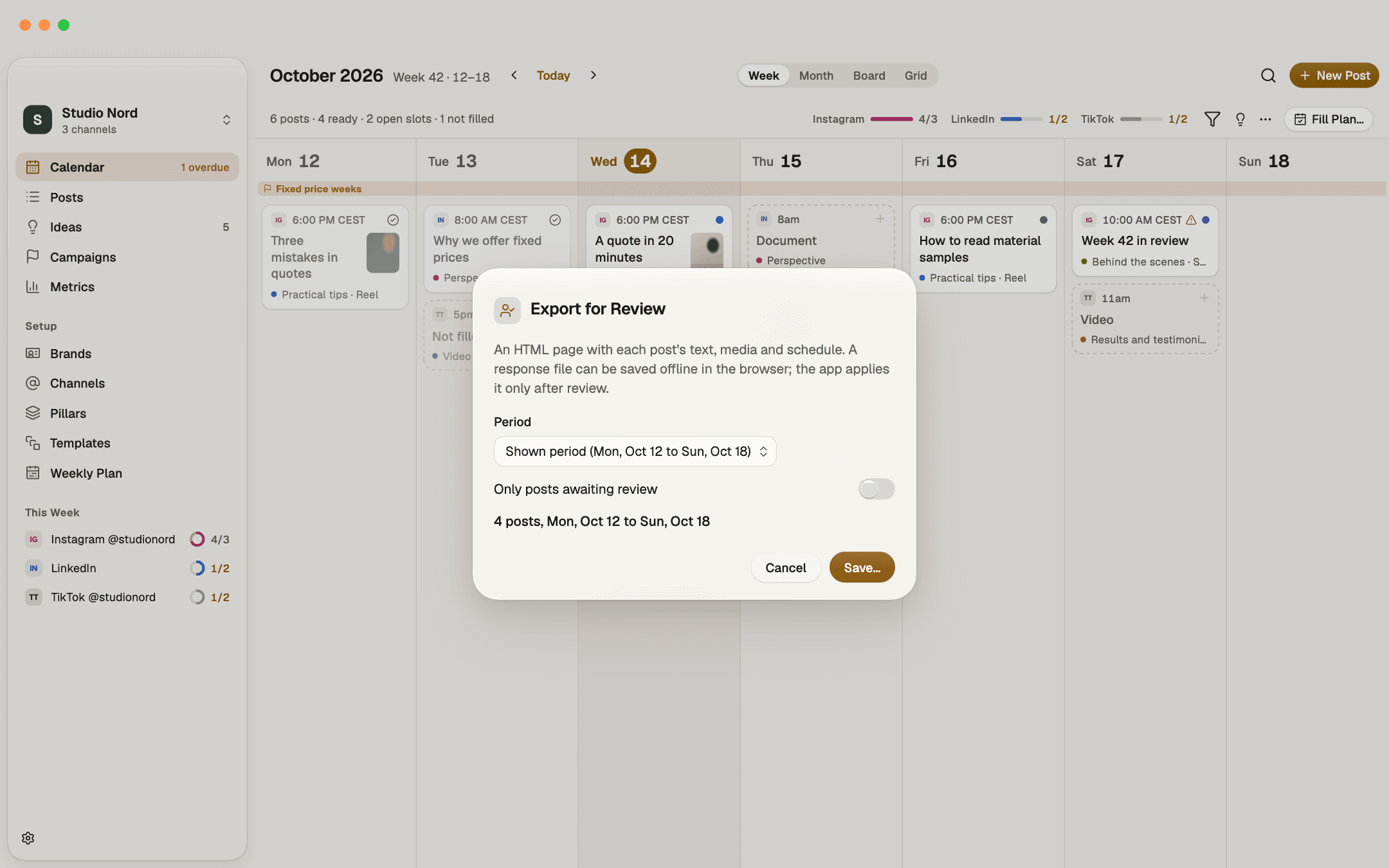
“Export for Review…” in the calendar menu opens a dialog with the period, for example the week currently shown, and the switch “Only posts awaiting review”. Below it, the dialog says how many posts the page will contain. Published and discarded posts are left out, and at most 32 posts fit into one review.
With “Save…”, the planner first stores a request in the workspace, with its own ID and, for each post, a SHA-256 checksum of the displayed text and media list. Then you save the HTML page and send it to the client, for example by email or through a shared folder.
What the client sees
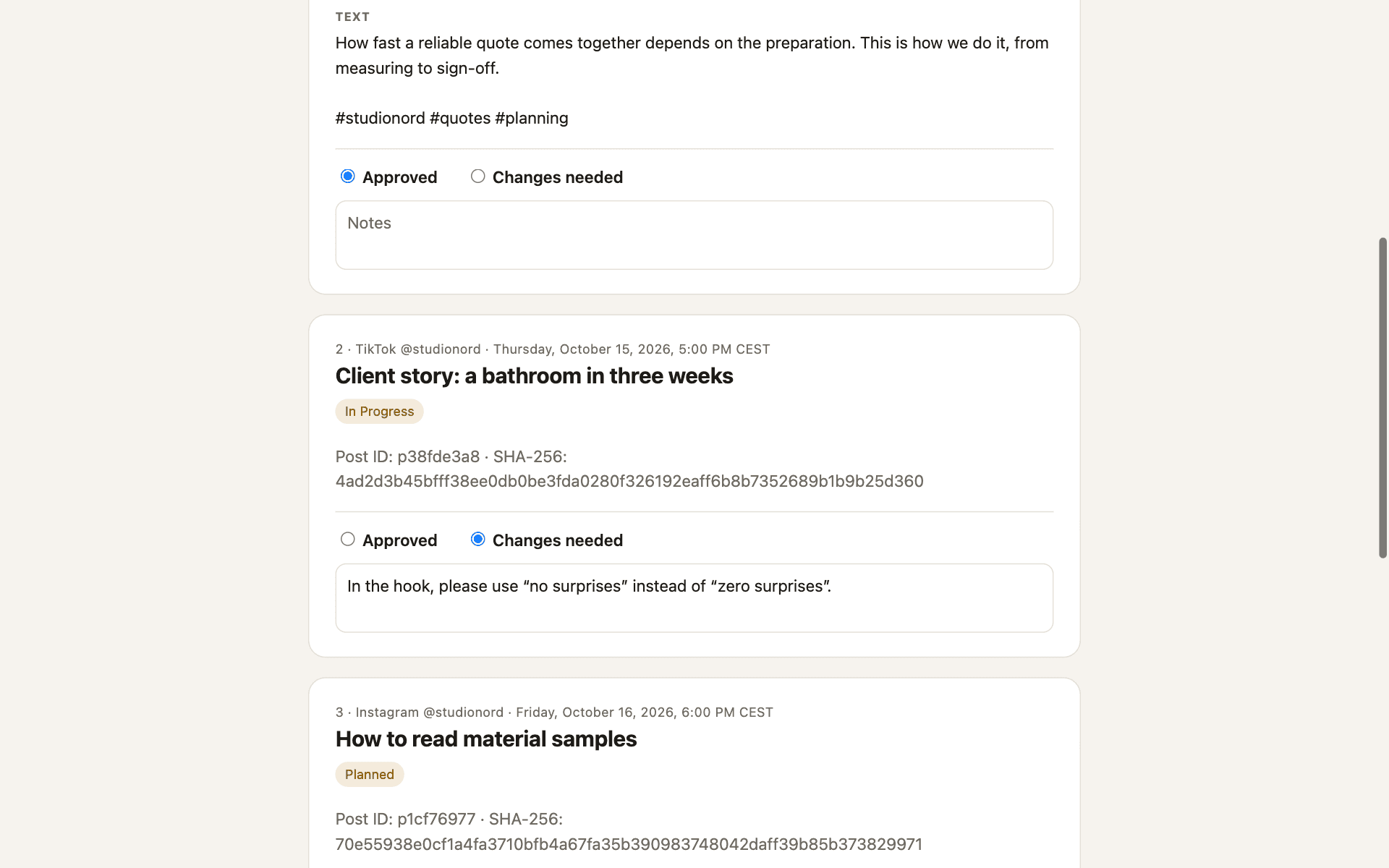
The client opens the page in any browser. At the top are the workspace, period and number of posts, then for each post the channel, date, title, status, campaign, media and text. Each post has “Approved” and “Changes needed” plus a field for notes.
At the end, the client enters a name and uses “Save response file” to save a small JSON file, which they send back. The page states clearly that name and time are unverified and that the decision only takes effect after confirmation in the app. Clients who prefer paper can print the page instead.
Importing and checking the response
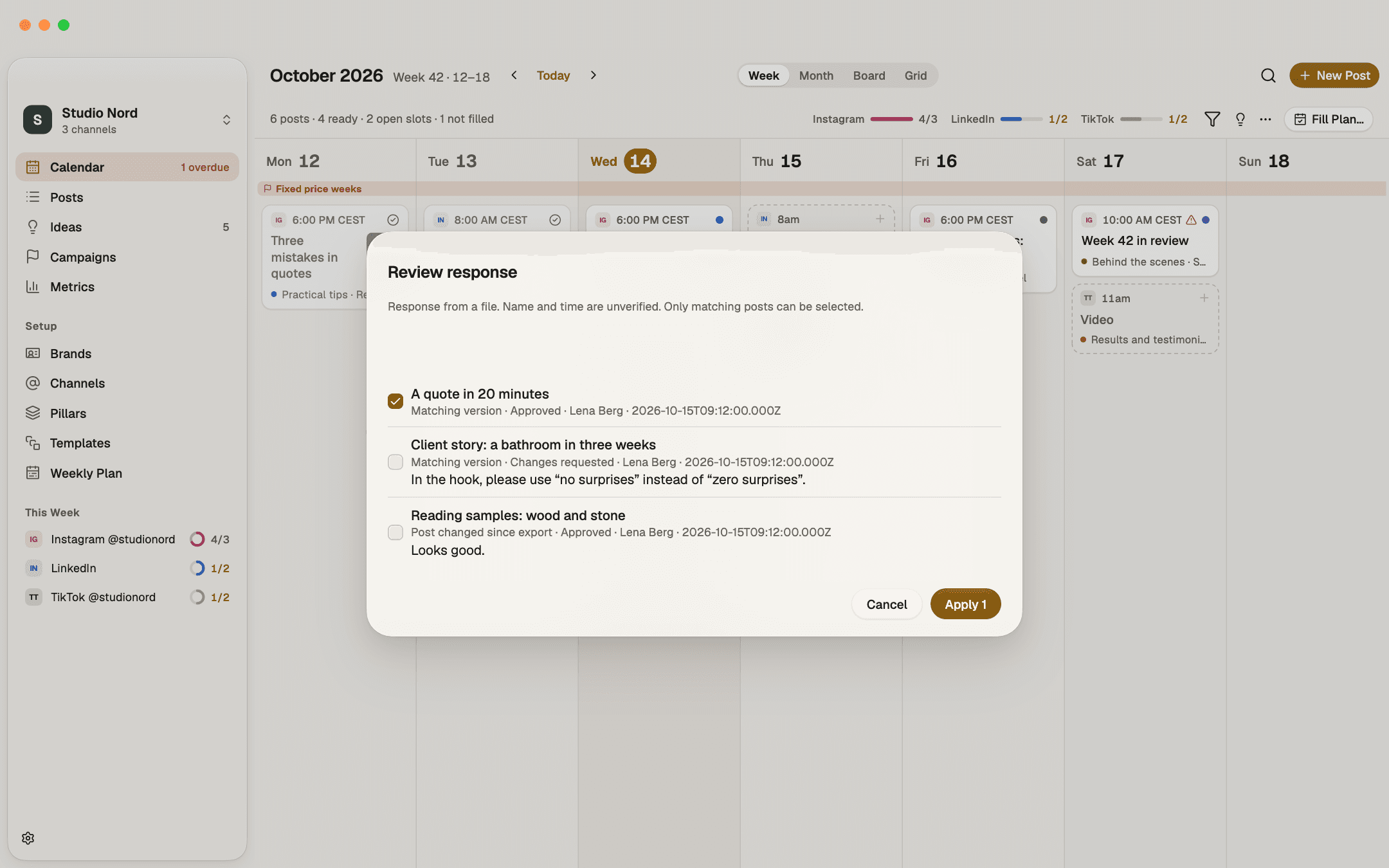
You read the file in with “Import review response…”. The app matches it to the stored request and checks for each post whether the text is still the same as at export. The “Review response” preview shows, for each post, the match, the decision, the name, the time and the full comment.
Only posts with a matching version can be ticked. “Apply …” writes the approval and comment into the post; a change request sends a post marked ready or scheduled back to draft. Matching feedback from the same file that you didn’t select stays available for later.
What a file-based approval proves, and what it doesn’t
The page contains checksums of the displayed text and the media list. This lets the app tell whether the answer belongs to exactly the version the client saw. It’s not a digital signature: someone who altered both the request and the response could fool the check.
The name and time in the answer are unverified, and the app says so. A legally binding approval needs other evidence. For everyday work between agency and client, what the file offers is often enough: a clear link between a decision, a comment and a specific version.
Approvals in a team and for several clients
In a post’s inspector, the “Approval” section records the status, an owner and comments. Under “Your Name” you set the name your comments and approvals show up with on this device. If the workspace is shared with the team, everyone sees the same status.
Instead of the period shown, a review can also cover several weeks from today. If filters are set in the calendar, for example for a brand or a channel, the review can be limited to the filtered posts. That way each client only sees their own posts, even when several brands share one workspace.
How it works
Prepare the posts
Finish the posts; optionally request approval and set an owner under “Approval” in the inspector.
Export for review
Choose “Export for Review…” in the calendar menu, set the period, turn on “Only posts awaiting review” if needed and save the HTML page with “Save…”.
Send the page
Send the HTML file to the client by email or through a shared folder, asking them to send back the response file.
The client responds
The client opens the page, decides on each post, enters a name, uses “Save response file” and sends the file back.
Import the response
Choose “Import review response…” in the calendar menu, tick matching feedback in “Review response” and apply it.
At a glance
- Posts per review
- up to 32
- Notes
- up to 4,000 characters
- Response file
- JSON, up to 64 KiB
- Client needs
- a browser, no account
- Status
- Soon: built, not released yet
Limits
What the feature can’t do yet, or what hasn’t been tested.
- Built and tested, but not in a released version yet. What’s released so far is the review page to tick and print, without a response file.
- Name and time are unverified, and the checksums are not a signature. The approval doesn’t identify a person and isn’t legally binding.
- If the interface language changes between export and import, a post may show as changed; nothing is applied automatically then.
- The system file dialog and importing a really downloaded file in the app haven’t been checked yet.
- The preview currently shows the response time in technical format (ISO 8601, UTC).
Frequently asked questions
What does it cost?
Nothing. Balane Office is free, with no account and no in-app purchases. Your client only needs a browser too.
Does the client need an account or an app?
No. The review page opens in any browser, even offline, and saves the answer as a file.
Is the approval legally binding?
No. Name and time are unverified, and the checksums are not a signature. They only show that the answer matches the exported version.
What if I change a post after exporting?
The preview marks it as changed since export, and the feedback isn’t applied. For the new version, export a new review.
Could I import the same response twice by mistake?
You can read it in, but not apply it again. A marker in the post recognises feedback that has already been applied; the preview shows it as already applied and won’t apply it again.
Can the client see images and videos?
The page embeds images up to 4 MiB (PNG, JPEG, GIF, WebP) directly. Other media, such as videos, appear by file name; the client sees which file is meant, but not the file itself.
When will the feature be available?
It’s built and tested and ships with the next released version of the Content Planner. There’s no fixed date yet.
Balane Office is a long-running experiment: nine office apps, mostly built with AI. The apps are free and save to your own device. About the experiment →