Write a German business letter from a DIN 5008 template
DIN 5008 sets out where the address, information block and subject line go on an A4 page, so a letter fits a window envelope and reads the same everywhere. This page explains layout B and shows how to write such a letter with the template in Documents.
What it does
- Layout B margins
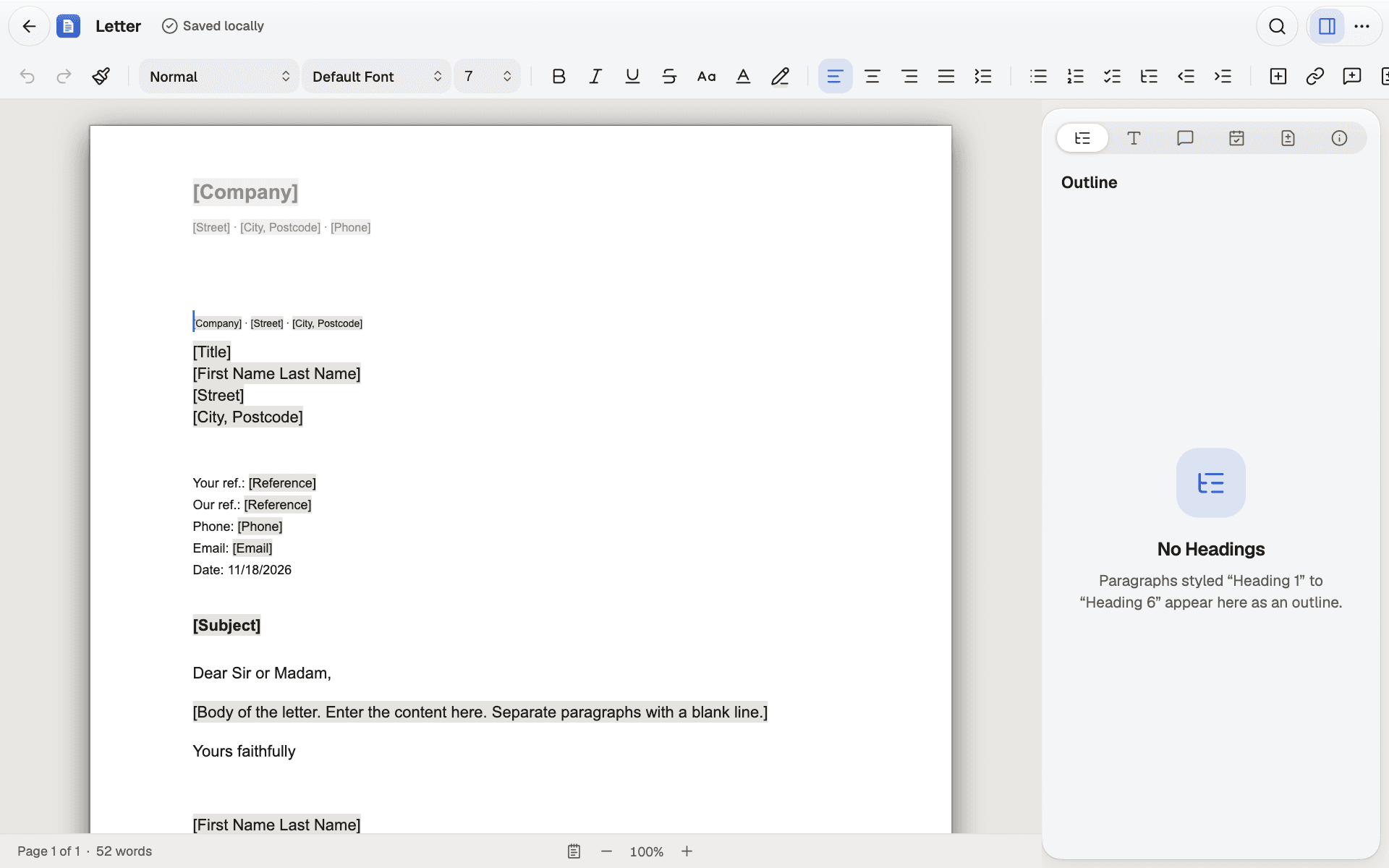
- The template sets 45 mm at the top, 25 mm left, 20 mm right and 25 mm at the bottom. The letterhead with company name and contact line sits in the header above the address field.
- Address field with return line
- Above the address there is a return-address line in 7-point type, followed by title, name, street and town on separate lines.
- Information block
- Your reference, our reference, phone, email and date follow the address in smaller type. The template fills in today’s date when you create the letter.
- Placeholders to overwrite
- Everything you need to fill in is in square brackets with a grey highlight, so a forgotten field stands out before you send the letter.
- Page numbers and enclosures
- The footer shows “Page x of y”. Closing, name, position and a list of enclosures under a bold “Enclosures” heading are already in place.
- Your own letter template
- Once your sender details and logo are in, store the letter with “Save as Template…”. It then appears on the start page under “My Templates”.
What DIN 5008 covers
DIN 5008 is the German standard for “writing and layout rules for text and information processing”. The current edition dates from March 2020. It covers far more than letters: it also defines how numbers, dates, times and phone numbers are written, how lists are set and how emails are structured.
For business letters, the standard defines fixed areas on the A4 page: letterhead, address field with a zone for postal notes, information block, subject line, salutation, body, closing and enclosures. Because the address field sits in a fixed position, the folded letter fits a window envelope, and recipients always find references and date in the same place.
The standard is only binding where someone requires it, such as a public authority or a company’s corporate design. The text of the standard itself is sold, not free. Freely available summaries describe it and differ in the details, so if you need precision, refer to the standard itself.
Layout A and layout B
DIN 5008 has two letter layouts. In layout A the letterhead is short, commonly given as 27 mm, and the address field sits high up. In layout B the letterhead is taller and the address field lower; the address begins 45 mm below the top edge of the page.
Layout B is common in business because it leaves more room for a logo and company details. In both layouts the address field is 85 mm wide and 45 mm high, matching the window of standard envelopes. The left alignment line, where address, subject, body and closing begin, sits 25 mm from the left edge.
The template in Documents follows layout B. The app doesn’t include a layout A template; if you need layout A, change the margins in “Page Setup…” and move the address up accordingly.
The letter, area by area
Postal notes zone: the top lines of the address field hold the return address and notes such as “Registered mail” (Einschreiben) or “Do not forward”. In the template this is the sender line “[Company] · [Street] · [City, Postcode]” in small type.
Information block: under DIN 5008 it sits to the right of the address field, commonly given as 125 mm from the left edge. The Documents template puts your reference, our reference, phone, email and date below the address instead, because the editor has no side-by-side text frames.
Subject line: it is written without the word “Subject”, with no full stop and no underline; bold is usual. Two blank lines separate it from the salutation. The template sets the subject in bold and leaves space before “Dear Sir or Madam,”.
Closing and enclosures: the closing follows the body after one blank line, with at least three blank lines left for the signature. The enclosures note goes in bold below the name. Both are set up in the template.
Finding the template in Documents
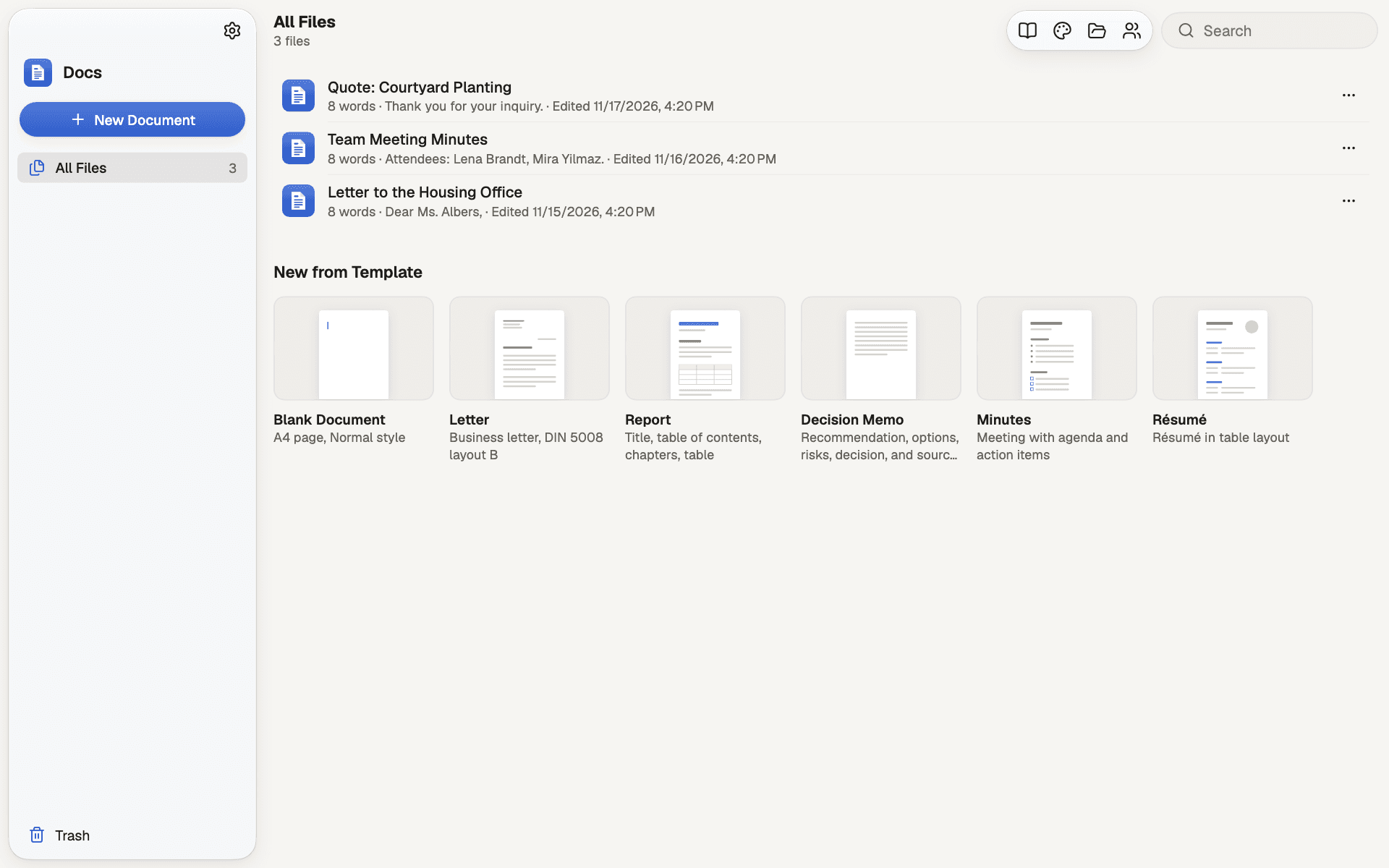
On the start page, Documents shows six built-in templates under “New from Template”. The second is called “Letter”, described as “Business letter, DIN 5008 layout B”. One click creates a new document and opens it in the editor.
The content is created in the interface language: in German the letter starts with “Sehr geehrte Damen und Herren,”, in English with “Dear Sir or Madam,”. After that it is ordinary document content that you can change freely.
Once sender details, logo and footer are right, it’s worth making your own template. “Save as Template…” puts it on the start page under “My Templates”; the document itself stays as it is.
Margins and page setup
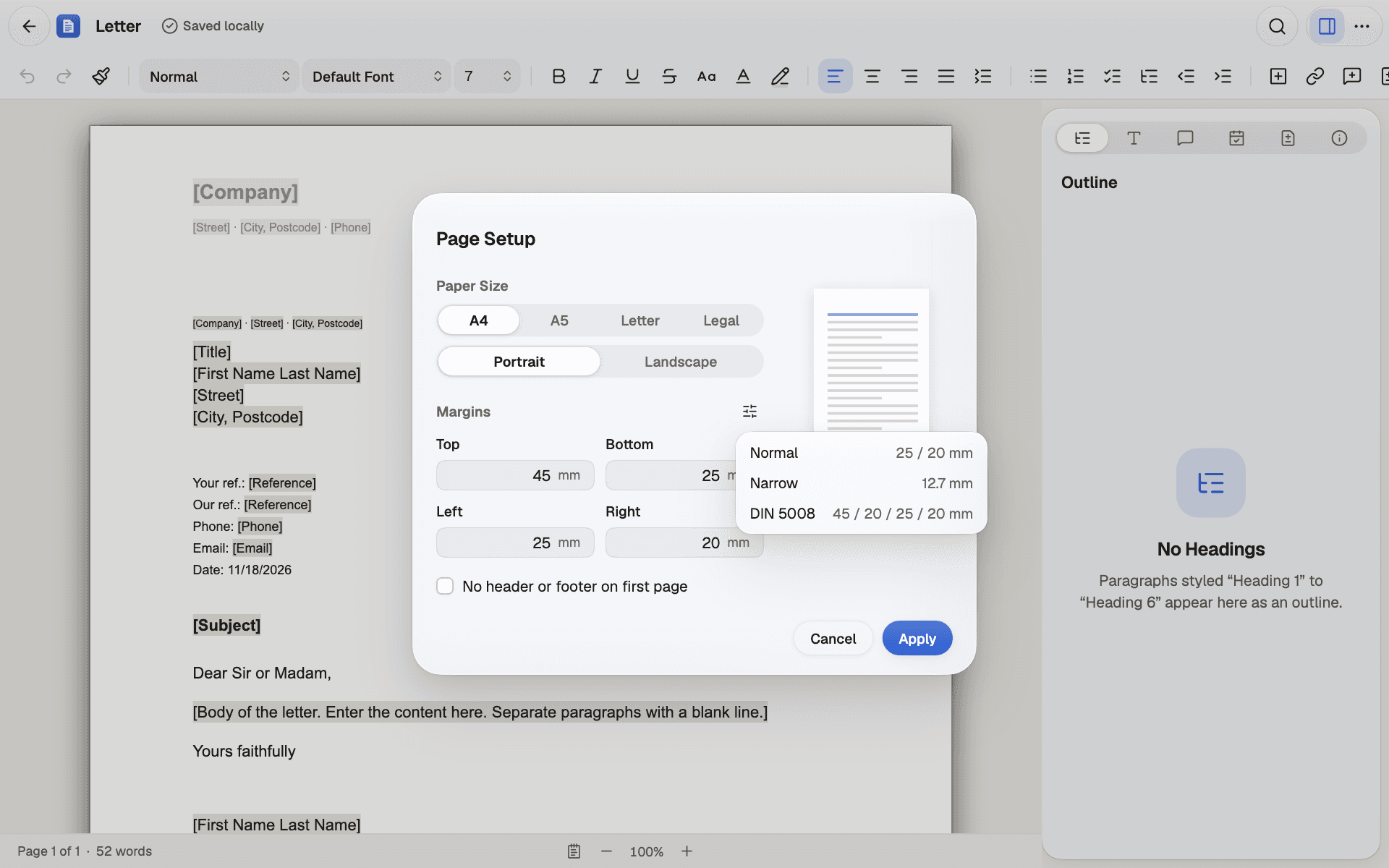
Freely available summaries give layout B as 45 mm top, 25 mm left, 20 mm right and 20 mm bottom. These are exactly the values the “DIN 5008” preset applies in the Documents “Page Setup” dialog (order top, bottom, left, right: 45 / 20 / 25 / 20 mm).
The letter template itself leaves 25 mm at the bottom so the “Page x of y” footer has room below the text. If you prefer 20 mm, pick the preset in the dialog or type the value. Margins between 0 and 100 mm are accepted.
The same dialog sets paper size (A4, A5, Letter, Legal) and orientation, and can leave the first page without header and footer, for example when follow-on pages should only carry a slim header.
Dates, numbers and required company details
DIN 5008 writes dates numerically as YYYY-MM-DD following ISO 8601, so 2026-11-18, or spelled out as “18. November 2026”. The DD.MM.YYYY form, 18.11.2026, is only intended for recipients within Germany under the 2020 edition. The German template enters the date in this short form; for a letter abroad, overwrite it. The English template uses the US form 11/18/2026.
Separately from DIN 5008, German commercial law requires registered companies to show certain details on business letters: company name, legal form, registered office, register court, commercial register number and, depending on the legal form, the names of the managing directors. The template has no dedicated field for this. The footer is the usual place; in the template it holds the page number, with room for another line.
Common mistakes in business letters
Placeholders are left in. That’s why every field to fill in is highlighted grey in the template; before exporting, check for leftover square brackets. Searching for “[” finds them quickly.
The address slips out of the window. Adding blank lines above the address or changing the top margin moves it. If the margin stays at 45 mm and the return line is the first line, the address sits where layout B expects it.
A subject line starting with “Subject:”, underlined or ending in a full stop, and a salutation directly under it with no gap are the most common departures from the standard. The template sets the bold and the spacing; you only replace the text.
From letter to sending it
Export finished letters as PDF via “Export…” or print them via “Print…” through the system dialog. For recipients who keep editing, save as DOCX or ODT; the round trip has been tested with LibreOffice, not yet with Microsoft Word.
You can sign or stamp the PDF in Paperwork and send it as an attachment with Mail. If the same letter goes to many recipients, replace the address with placeholders such as {{ Name }} and use mail merge.
How it works
Pick the template
On the start page, under “New from Template”, click “Letter”. The new letter opens in page view.
Fill in letterhead and sender
In the header, replace [Company] and the contact line, then the return line above the address.
Address, references and subject
Enter title, name, street and town, then your and our reference in the information block, then the subject without the word “Subject”.
Body, closing and enclosures
Replace the grey paragraph with your text, enter name and position, list enclosures or delete the list.
Check the margins
If needed, open “Page Setup…”; under “Presets”, “DIN 5008” sets margins of 45 / 20 / 25 / 20 mm.
Save it as your template
With sender and logo in place, choose “Save as Template…”. Your next letter starts from “My Templates” with your details.
Export
“Export…” for PDF, DOCX or ODT, or “Print…” for paper.
At a glance
- Layout
- DIN 5008, layout B
- Template margins
- top 45, left 25, right 20, bottom 25 mm
- “DIN 5008” preset
- 45 / 20 / 25 / 20 mm
- Export
- PDF, DOCX, ODT, print
- Other templates
- Report, decision memo, minutes, résumé
Limits
What the feature can’t do yet, or what hasn’t been tested.
- Layout B only. There’s no layout A template, though you can change the margins in page setup.
- The information block sits below the address, not to its right as DIN 5008 places it.
- Letterhead and information block are set right-aligned in the template but appear left-aligned in the editor’s on-screen view (found on 18 November 2026, under review).
- The template doesn’t add fold or punch marks, and has no fields for required company details such as the register court.
- There’s no documented check against the text of the standard or with window envelopes.
Frequently asked questions
Is the template layout A or layout B?
Layout B, with a 45 mm top margin. Page setup also has a “DIN 5008” margin preset of 45, 20, 25 and 20 mm (top, bottom, left, right).
How do I write the date under DIN 5008?
Numerically as 2026-11-18 or spelled out as “18. November 2026”. The 2020 edition only intends 18.11.2026 for recipients within Germany. The German template uses that short form, so overwrite it for letters abroad.
Do I write “Subject:” before the subject line?
No. Under DIN 5008 the word is dropped, and the subject has no full stop and no underline. The template sets it in bold.
Will the letter fit a window envelope?
The address starts 45 mm below the top edge, as in layout B. A test with real envelopes hasn’t been documented, so check your first printout against your envelope.
Can I keep editing the letter in Word?
You can save it as DOCX. The round trip has been tested with LibreOffice, not yet with Microsoft Word.
Does the template cost anything, and do I need internet?
The template is part of Documents and free. It’s built into the app and works without a connection; the letter is saved on your device.
Balane Office is a long-running experiment: nine office apps, mostly built with AI. The apps are free and save to your own device. About the experiment →