Open DOCX without Word and keep editing
A DOCX file arrives by email, but Word isn’t installed. This page explains what’s inside a DOCX file, the ways to open it without Word, and how Documents opens it, tells you what it had to simplify, and hands it back as DOCX, ODT or PDF.
What it does
- Open
- DOCX, ODT, Markdown and plain text. The file always opens; content that can’t be represented is simplified and listed one by one, nothing is silently dropped.
- Save and export
- Back to DOCX or ODT, plus Markdown, HTML, text and PDF. Your working file is the app’s own .bdoc format, with autosave and a backup copy.
- What’s kept
- Styles, character and paragraph formatting, lists, tables with merged cells, images, links, footnotes, headers and footers, table of contents and page setup.
- Review included
- Threaded comments and tracked insertions and deletions are read from DOCX and written back.
- Charts from Word
- Charts in DOCX files are brought in as charts from their stored values; 3D styles are simplified, with a notice.
What’s inside a DOCX file
DOCX is the format Word saves documents in by default; it replaced the older binary .doc format. The format is called Office Open XML and is standardised as ECMA-376, first in December 2006, and internationally as ISO/IEC 29500.
Technically, a DOCX file is a ZIP archive of separate XML parts: text, styles, comments, headers and embedded images are stored separately. If one part is damaged, a chart for example, the rest can often still be opened. Files ending in .docx contain no macros; that’s what .docm is for.
Because the format is openly documented, other programs can read and write DOCX too. Each covers only part of Word’s feature set, though. So the key question isn’t whether a program opens DOCX, but what it simplifies on the way.
Ways to open DOCX without Word
Microsoft offers Word for the web for free; you sign in with a Microsoft account and the file is edited online. Google Docs opens DOCX from Google Drive and converts it to a Google Doc; without conversion, it works in Office Compatibility Mode with a Chrome extension. Macros aren’t supported there, and SmartArt becomes a drawing.
LibreOffice is a free desktop office suite that saves in the open ODF format by default but also reads and writes DOCX. Documents from Balane Office is another option: the app runs on your device or in the browser, needs no account and keeps the file local.
Which option fits depends on the file. A letter with headings, a table and comments works almost anywhere. A form with text boxes, floating graphics or multi-column layout loses something in every program except Word; then what counts is whether the program tells you what.
Opening in Documents: import notes
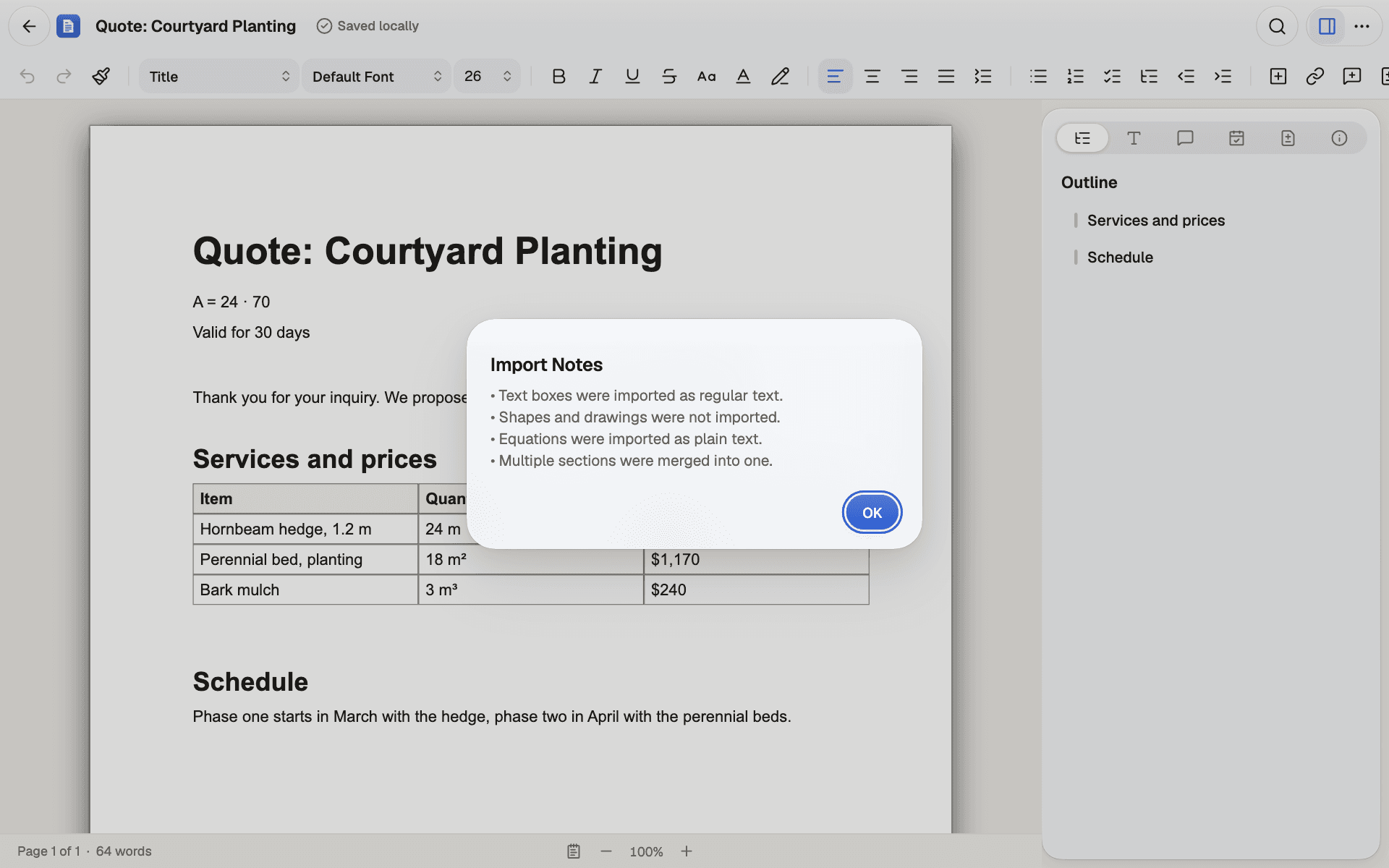
On the start page, “Import…” (Ctrl+O, or ⌘O on a Mac) opens the file picker for DOCX, ODT, Markdown and text. Documents reads the file, creates a new document in the library from it and opens it in the editor. The DOCX file itself stays untouched.
If the app had to simplify anything, the “Import Notes” dialog appears straight away with one line per kind. Typical entries: text boxes become normal text, shapes and SmartArt are dropped, equations become plain text, floating images are placed inline, multiple sections are merged into one.
That lets you decide before your first keystroke whether the file works for your purpose. For contract text with comments it almost always does; for a designed form with text boxes, probably not.
Editing as usual
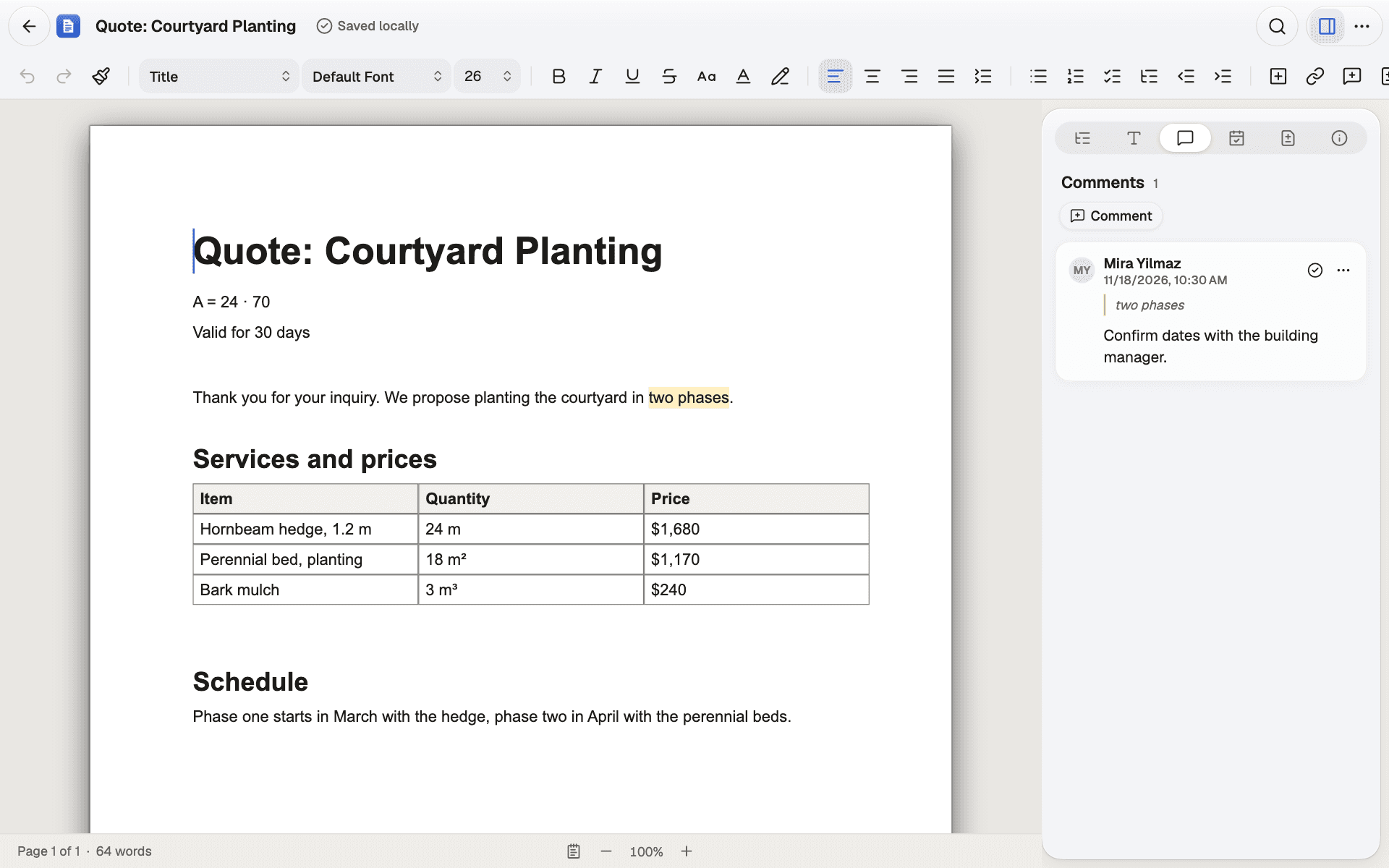
In the editor you work with the file’s styles: headings stay headings, lists stay lists, and tables keep their header row, merged cells and column widths. Footnotes, links, images and headers and footers with page numbers come along too.
Comments with replies and tracked changes from Word appear in the sidebar, where you can reply, accept or reject. Saving happens automatically in the app’s own .bdoc format with a backup copy; going back to Word format is done by exporting.
Handing it back as DOCX, ODT or PDF
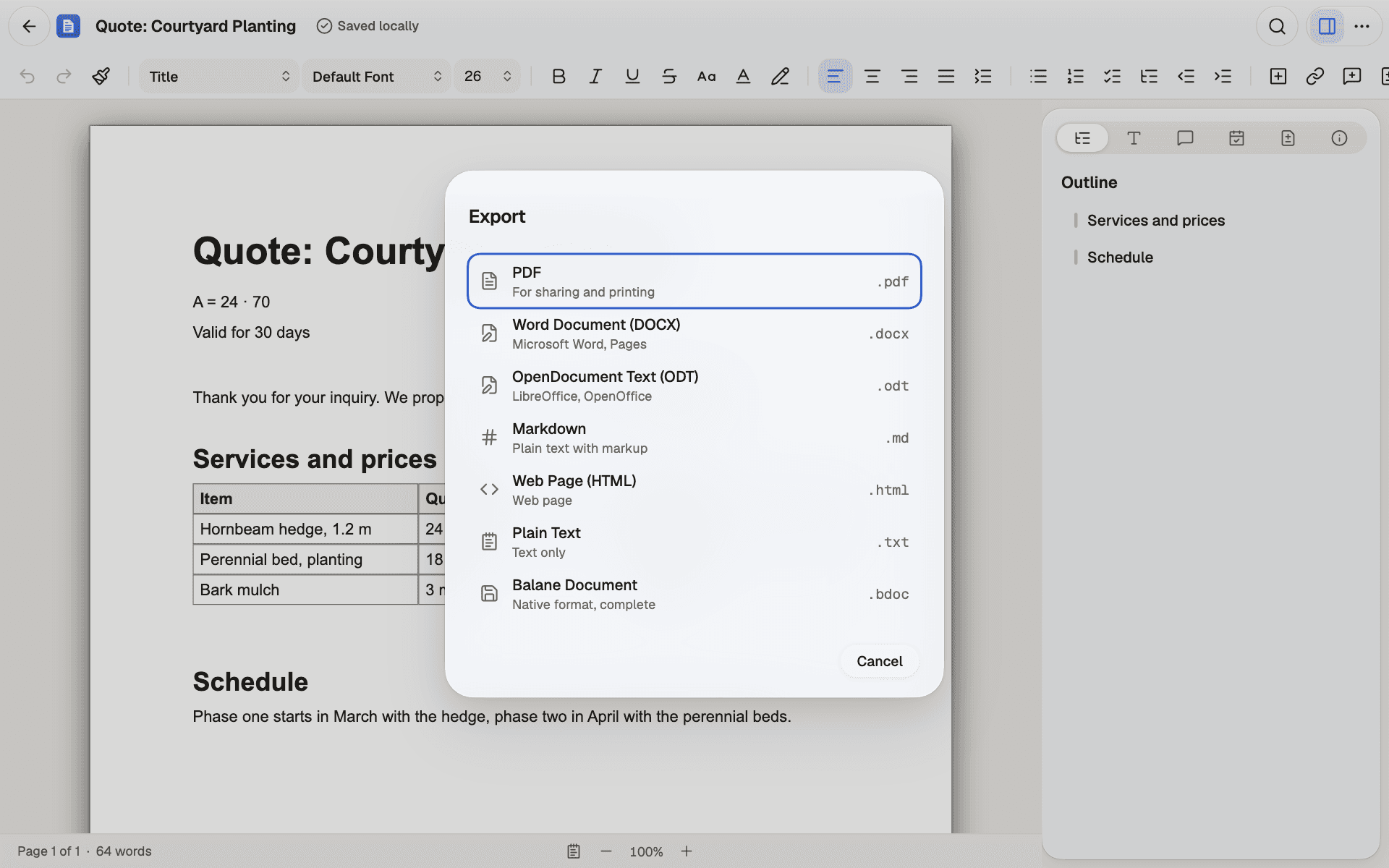
“Export…” offers PDF, DOCX, ODT, Markdown, HTML, plain text and the app’s own format. If the other side keeps working in Word, choose DOCX; for LibreOffice or an organisation that requires open formats, ODT. If nobody should change it any more, PDF is right.
Anything simplified on opening doesn’t come back when you save: dropped SmartArt stays gone, merged sections stay one. When you return a file to someone who keeps working in Word, tell them what the import notes listed.
With LibreOffice 26.2 it has been checked that DOCX and ODT from Documents open without repair and that headings, a table, images, a footnote and comments read back in after saving there. A check against Microsoft Word is still pending.
DOCX or ODT?
ODT is the text format of the OpenDocument standard, published by OASIS and standardised as ISO/IEC 26300 since 2006. LibreOffice saves in it by default. Public bodies increasingly rely on open formats; in March 2026 Germany’s IT Planning Council set ODF and PDF/UA as document standards for public administration.
Documents writes both formats. ODF doesn’t know comment replies or resolved status; Documents writes LibreOffice’s extension for them, which other programs show as separate comments.
What gets lost in the exchange
Floating images are placed inline, and there’s no text wrapping around images. Documents has no sections or columns: several sections become one, separate headers and footers for even pages are dropped, and endnotes become footnotes.
Shapes, SmartArt, embedded objects and images in EMF, WMF, TIFF or SVG format are dropped. Text boxes become normal text, equations plain text. Double or dashed table borders become single lines, and exact row heights become minimum heights.
With tracked changes, insertions and deletions are kept, while formatting changes and table-row changes are dropped, and moved text becomes a deletion plus an insertion. Each of these cases appears in the notes when the file opens.
On to other apps
Finished texts go to Paperwork as PDF, for signing for example, or to Mail as an attachment. Data from Sheets, Reports and Forms can be inserted as a linked table or chart and refreshed when you choose.
How it works
Import
On the start page, choose “Import…” (Ctrl+O) and pick the DOCX or ODT file.
Read the notes
If “Import Notes” appears, check whether the listed simplifications matter for your purpose, then “OK”.
Edit
Change text, styles, tables and images as usual and reply to comments in the sidebar. The app saves automatically.
Choose the format
Open “Export…”: DOCX for Word, ODT for LibreOffice and open formats, PDF for passing on without editing.
Hand it back
Send the exported file and mention what was simplified when it opened.
At a glance
- Opens
- DOCX, ODT, Markdown, text
- Saves
- DOCX, ODT, Markdown, HTML, text, PDF
- Original file
- stays untouched
- Tested with
- LibreOffice 26.2
- Also in
- Browser
Limits
What the feature can’t do yet, or what hasn’t been tested.
- No text wrapping around images: floating images are placed inline.
- No sections or columns. Several sections in a DOCX file become one.
- Shapes, SmartArt, embedded objects and EMF, WMF, TIFF and SVG images are dropped; text boxes become normal text, equations plain text.
- Simplified content doesn’t come back when you save. The round trip with Microsoft Word hasn’t been tested yet.
Frequently asked questions
Do I need Word to edit DOCX?
No. Documents opens and saves DOCX without Word or any other office suite, free and without an account.
Does opening change my DOCX file?
No. On import, Documents creates a new document in its own format. A DOCX version is only written when you export.
Does it work in the browser?
Yes. In the browser you import DOCX, ODT, Markdown and text through the file picker, and exports arrive as downloads. Documents are kept in the browser’s storage.
Is anything lost when I save?
Anything simplified on opening, such as shapes or multiple sections, doesn’t come back when you save. The app names these spots when the file opens so you can decide.
Are comments and tracked changes kept?
Yes: comments with replies and tracked insertions and deletions are read and written back. Tracked formatting changes are dropped, with a notice.
Can I open old .doc files?
No. Documents doesn’t read the older binary .doc format, only DOCX, ODT, Markdown and text.
Balane Office is a long-running experiment: nine office apps, mostly built with AI. The apps are free and save to your own device. About the experiment →