View and check e-invoices
An XRechnung file is pure XML, a ZUGFeRD invoice is a PDF with embedded data. This page explains what counts as an e-invoice under German law, what has changed since 2025, what to check when one arrives and how Paperwork shows such invoices in readable form. Balane Office can’t create e-invoices.
What it does
- Three formats
- ZUGFeRD 2 and Factur-X (XML embedded in the PDF), plus XRechnung as XML in UBL or CII syntax, including Peppol UBL and credit notes.
- Readable invoice view
- Seller, buyer, line items, taxes, totals, due date, IBAN, BIC and payment reference. The IBAN can be copied with one click.
- Basic check
- Required fields from a core selection of EN 16931 (plus BR-DE-15 for XRechnung), totals rules and the IBAN check digit. Each finding names its rule.
- Notice on opening
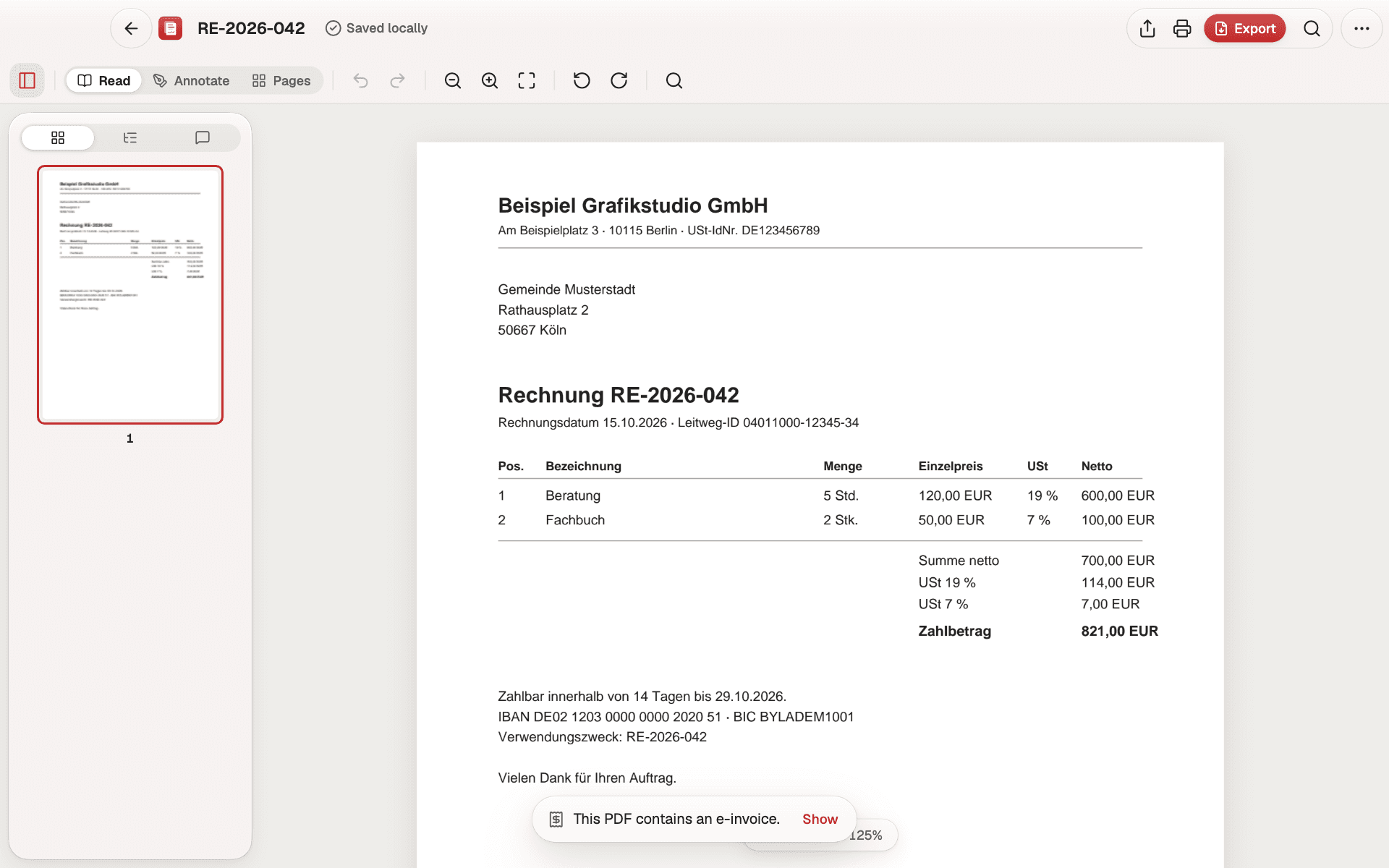
- When you open a PDF with an embedded e-invoice, Paperwork points it out. Plain XML files open from “Open E-Invoice…” on the home screen.
- Pass the data on
- Save the XML unchanged, export the invoice as CSV or pass it to Sheets and Reports as a dataset.
What counts as an e-invoice, and what doesn’t
Under section 14(1) of the German VAT Act (UStG), an electronic invoice is one that is issued, transmitted and received in a structured electronic format and allows electronic processing. The format must meet the European standard referenced by Directive 2014/55/EU, which is EN 16931. Alternatively, the parties may agree on another format, provided the data can be extracted correctly and completely into a standard-compliant one.
Everything else is an “other invoice”: paper, and also a PDF that only contains a picture of the invoice. A PDF invoice sent by email without embedded data is therefore not an e-invoice in the legal sense, even though it arrives electronically.
Obligations and deadlines in Germany
For supplies between businesses established in Germany, the e-invoice is now the rule, and sending one no longer requires the recipient’s consent (section 14(1) and (2) UStG). Since 1 January 2025, businesses therefore have to be able to receive e-invoices. Transitional rules for issuing them are in section 27(38) UStG: for supplies until the end of 2026, paper and other formats are still allowed, other electronic formats only with the recipient’s consent. In 2027 this applies only to businesses whose total turnover in the previous year didn’t exceed EUR 800,000, and to EDI. From 2028 these exceptions end.
Under section 33 of the VAT Implementing Ordinance (UStDV), invoices up to EUR 250 may always be sent as an other invoice. The current rules are what count; this page isn’t legal or tax advice.
XRechnung, ZUGFeRD and Factur-X
XRechnung is the standard for electronic invoices to public-sector buyers in Germany. KoSIT runs it on behalf of the IT Planning Council. XRechnung narrows the EN 16931 data model and uses one of two XML syntaxes, UBL 2.1 or UN/CEFACT CII. For routing invoices to authorities there’s the Leitweg-ID; in the invoice it appears as the buyer reference, and rule BR-DE-15 requires it.
ZUGFeRD is a hybrid format: a PDF/A-3 with structured invoice data embedded as XML, in CII syntax since version 2.0. People read the PDF, software reads the XML. Paperwork treats ZUGFeRD 2 and Factur-X the same way, since both carry CII XML inside the PDF. The picture and the data can differ, which is why the view states that the XML file is what counts.
What to check
When an e-invoice arrives, there are three questions: is the file formally valid, are the required fields and figures correct, and does the invoice match the order? The first is answered by a validator against the official rules; for XRechnung, KoSIT provides a configurable validation tool. No software can answer the last one on its own.
Paperwork helps with the middle question and with reading. The basic check flags missing required fields such as invoice number (BT-1), issue date (BT-2), name and country of seller and buyer, a missing line or a missing amount due. It recalculates totals rules BR-CO-10, 13, 14, 15, 16 and 17 and checks the IBAN check digit. If both the seller’s VAT ID and tax number are missing, a warning appears.
The invoice view in Paperwork
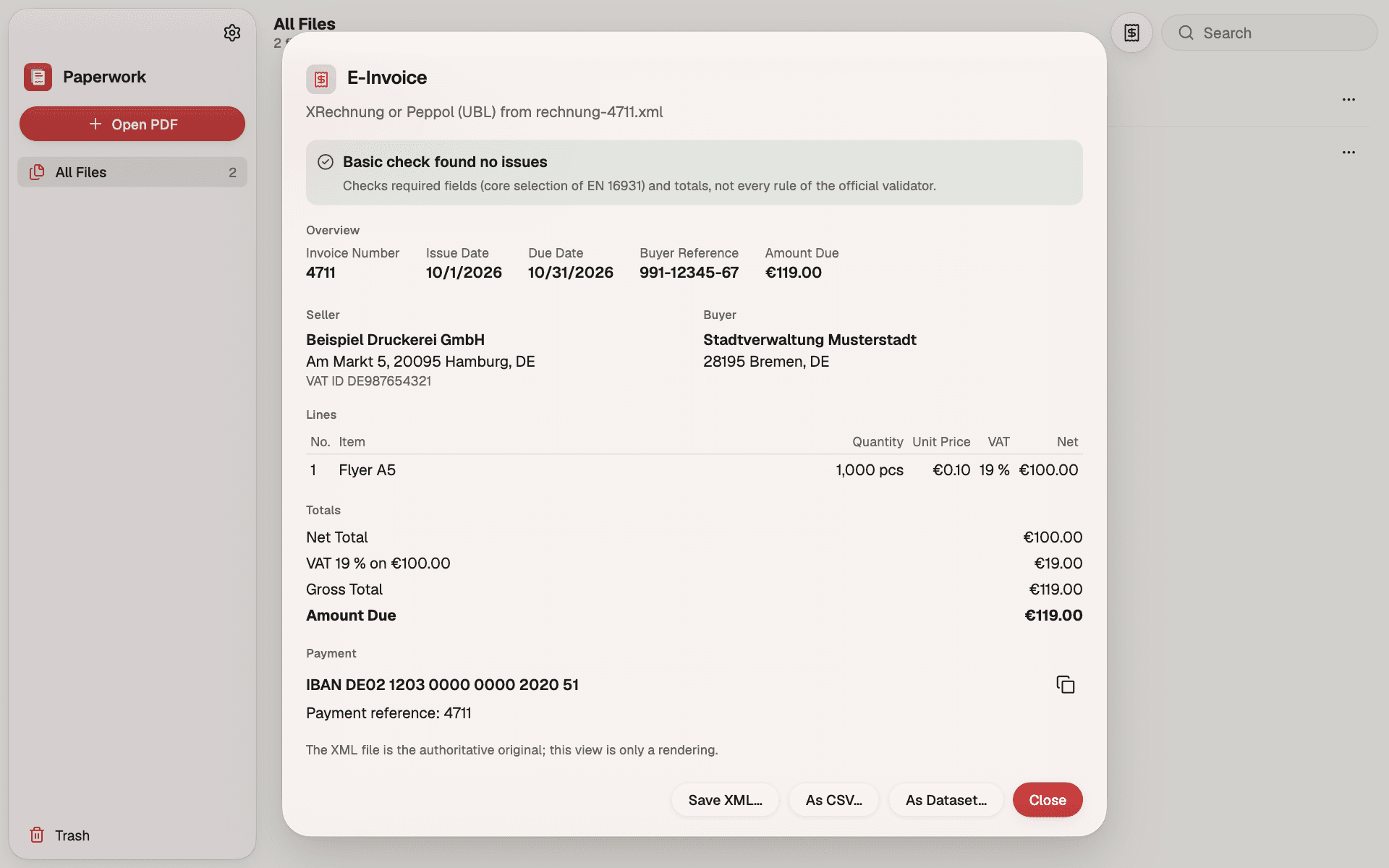
The check result comes first, followed by overview, seller, buyer, line items, totals and payment. Amounts use the number format of the interface language; the IBAN is grouped in fours and can be copied with Copy IBAN. At the bottom are Save XML…, As CSV… and As Dataset….
To open an XRechnung XML file, use Open E-Invoice… on the home screen. The same view appears when you choose Show in the notice for a ZUGFeRD PDF, or Show E-Invoice in the menu.
When the check finds something
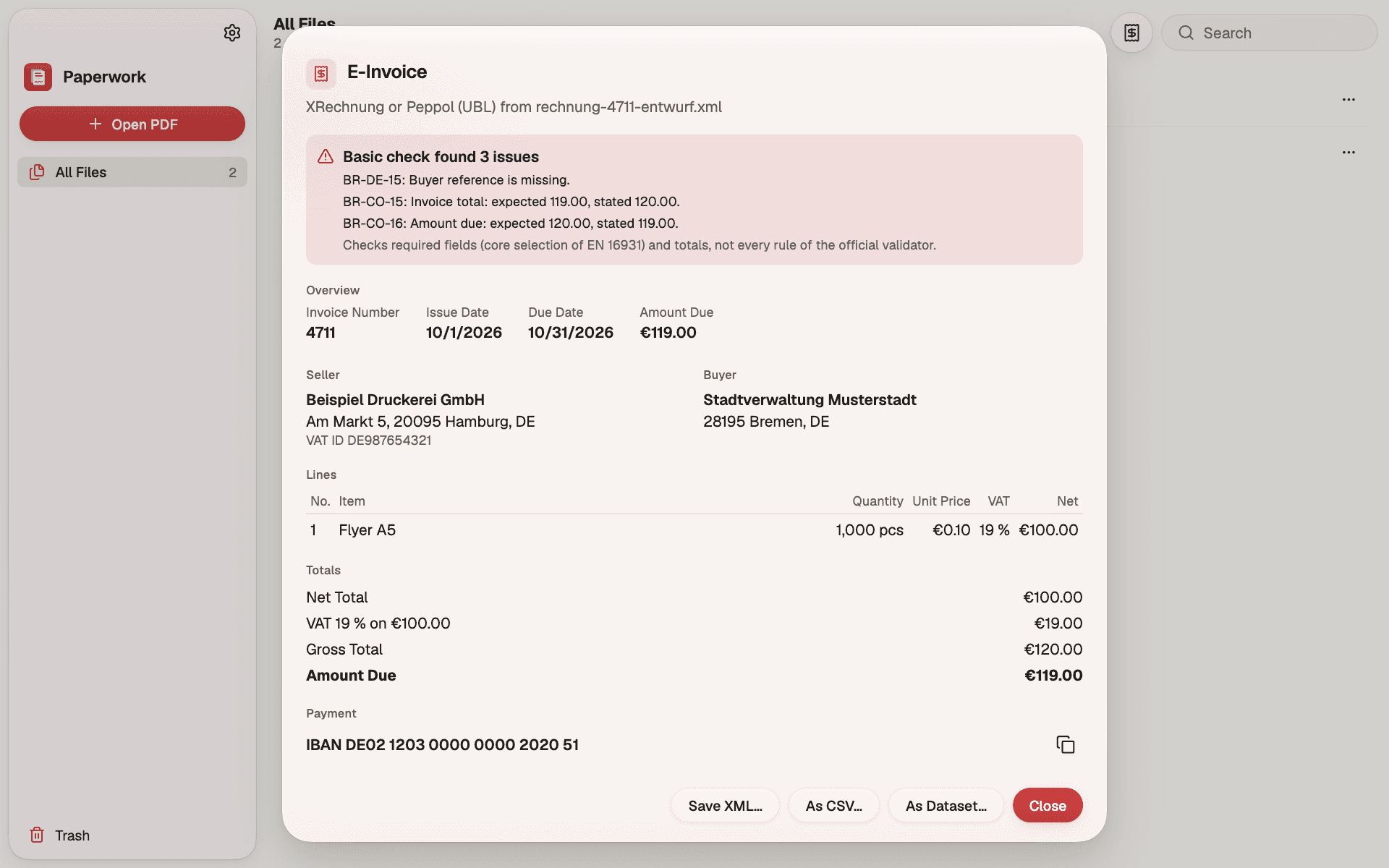
Each finding names the rule and, for totals, the expected and the stated value. In the example, the buyer reference is missing (BR-DE-15) and the gross total is one euro too high, which also makes the amount due inconsistent (BR-CO-15 and BR-CO-16). An invoice like that should go back to the sender.
Below the findings, the scope is always stated: the check covers required fields from a core selection of EN 16931 and the totals, not every rule of the official validator. An invoice without findings is plausible, but not fully validated.
Reusing the invoice data
Save XML… stores the XML unchanged, for your records for example. Exported as a dataset, the invoice data goes into Sheets or Reports, say for a list of open invoices. The CSV export works with any program that reads CSV and keeps decimal values the dataset can’t represent exactly; in that case the dataset export stops with a message instead of rounding silently.
Through Paperwork’s MCP server, Claude can read e-invoices, including the check findings. Every edit Claude makes can be undone in the app.
How it works
Open the invoice
Open a ZUGFeRD PDF like any PDF and choose Show in the notice, or pick an XRechnung file with “Open E-Invoice…” on the home screen.
Read the check
At the top it says “Basic check found no issues”, or it lists the findings with rule and values.
Go through the details
Compare overview, seller, buyer, line items, totals and payment with your order; copy the IBAN with Copy IBAN if needed.
Pass the data on
Choose “Save XML…”, “As CSV…” or “As Dataset…”.
At a glance
- Formats
- ZUGFeRD 2, Factur-X, XRechnung (UBL, CII)
- Check
- Required fields, totals, IBAN
- Export
- XML, CSV, dataset
- Create
- not supported
Limits
What the feature can’t do yet, or what hasn’t been tested.
- Read and check only. Neither Paperwork nor any other Balane Office app can create e-invoices.
- The check is basic: a core selection of required fields and totals rules, not full validation against the KoSIT rules (Schematron).
- Comparing the XML with the visible PDF text is built but not in a released version yet. Scanned PDFs aren’t read with text recognition for that.
- The view isn’t a legal or tax assessment of the invoice.
Frequently asked questions
Can I create e-invoices with Balane Office?
No. Paperwork reads and checks incoming e-invoices. Issuing an invoice in ZUGFeRD or XRechnung format isn’t built.
Is a PDF invoice sent by email an e-invoice?
Only if it contains structured data under EN 16931, as ZUGFeRD does. A plain PDF counts as an other invoice under section 14 UStG. Paperwork tells you on opening whether a PDF contains an e-invoice.
Do I already have to be able to receive e-invoices?
As a business in Germany, yes, since 1 January 2025: for invoices between domestic businesses, the sender no longer needs your consent. Transitional rules for issuing apply until the end of 2027.
How do I open an XRechnung file?
On the Paperwork home screen, choose “Open E-Invoice…” and select the XML file. The invoice appears as a readable view with line items and totals.
Does the check replace a full validation?
No. Paperwork checks required fields, totals and the IBAN, but not every rule of the KoSIT validator. The view helps with reading and plausibility.
What does BR-DE-15 mean?
It’s the XRechnung rule requiring a buyer reference, which for public authorities is the Leitweg-ID. If it’s missing, Paperwork reports the finding.
What does it cost, and do I need an account?
Nothing, and no. Balane Office is free, with no account and no in-app purchases. The invoice stays on your device.
Balane Office is a long-running experiment: nine office apps, mostly built with AI. The apps are free and save to your own device. About the experiment →