CAMT.053 reconciliation against your list
A CAMT.053 statement holds every booking with amount, date, counterparty and reference. Sheets reads it, or a bank CSV, and looks for the matching entry in your list for each booking. Clear matches are suggested; ambiguous ones you assign yourself.
What it does
- CAMT.053 and bank CSV
- CAMT.053 in versions .001.02, .001.04 and .001.08, or your bank’s CSV file with columns you assign.
- Clear rules
- Amount and currency must match exactly, the date within a tolerance you set from 0 to 31 days. The name explains a match but doesn’t force one.
- Amounts without rounding errors
- Amounts are processed as whole cents, not floating-point numbers. Calculated amounts in your list, such as the result of a SUM, are taken into account too.
- Ambiguous matches by hand
- Only pairs with exactly one candidate on each side are suggested. You assign ambiguous bank lines to a free list row one by one; each row can only be used once.
- Three result sheets
- Matches, open bank lines and open list rows. Everything is created in one step that a single undo removes again; the source sheets stay unchanged.
- No double import
- The app keeps a fingerprint of the statement file, not its path. The same statement can’t be reconciled twice in the same workbook, even after saving and reopening.
What CAMT.053 is
CAMT.053 is the electronic bank statement from the ISO 20022 message catalogue. “camt” stands for cash management, and the message is called BankToCustomerStatement there. The file is XML; the number after the name, such as .001.02 or .001.08, identifies the schema version and appears in the file’s namespace.
You usually get the statement as an export from online banking. It covers a period and contains one entry per booking: amount with currency code, a credit or debit indicator, booking status and booking date, plus the counterparty and references such as the end-to-end reference of the transfer.
The advantage over a CSV file is that the fields are fixed. With CSV, every bank has its own columns, separators and number formats, which you have to map yourself. CAMT has a catch too: one entry can bundle several transactions into a batch booking, for example for direct debit collections.
Reconciliation, open items and why it takes effort
Reconciliation assigns every payment on the account to an expected incoming or outgoing item: an invoice, a membership fee, a rent payment. What remains are two lists, payments without a counterpart and items without a payment. Those two lists are the actual result.
Deviations make it tedious. Payers spell their name differently, the bank books a few days later, two items have the same amount. If you do this by hand in a spreadsheet, you sort by amount, search with VLOOKUP or XLOOKUP and colour the matches. That works, but it gets error-prone as soon as amounts occur twice.
A wrong match is worse than an open item: it makes an unpaid invoice look paid. That’s why Sheets only suggests unambiguous pairs and leaves everything else open until you decide yourself.
Map the columns and set the date tolerance
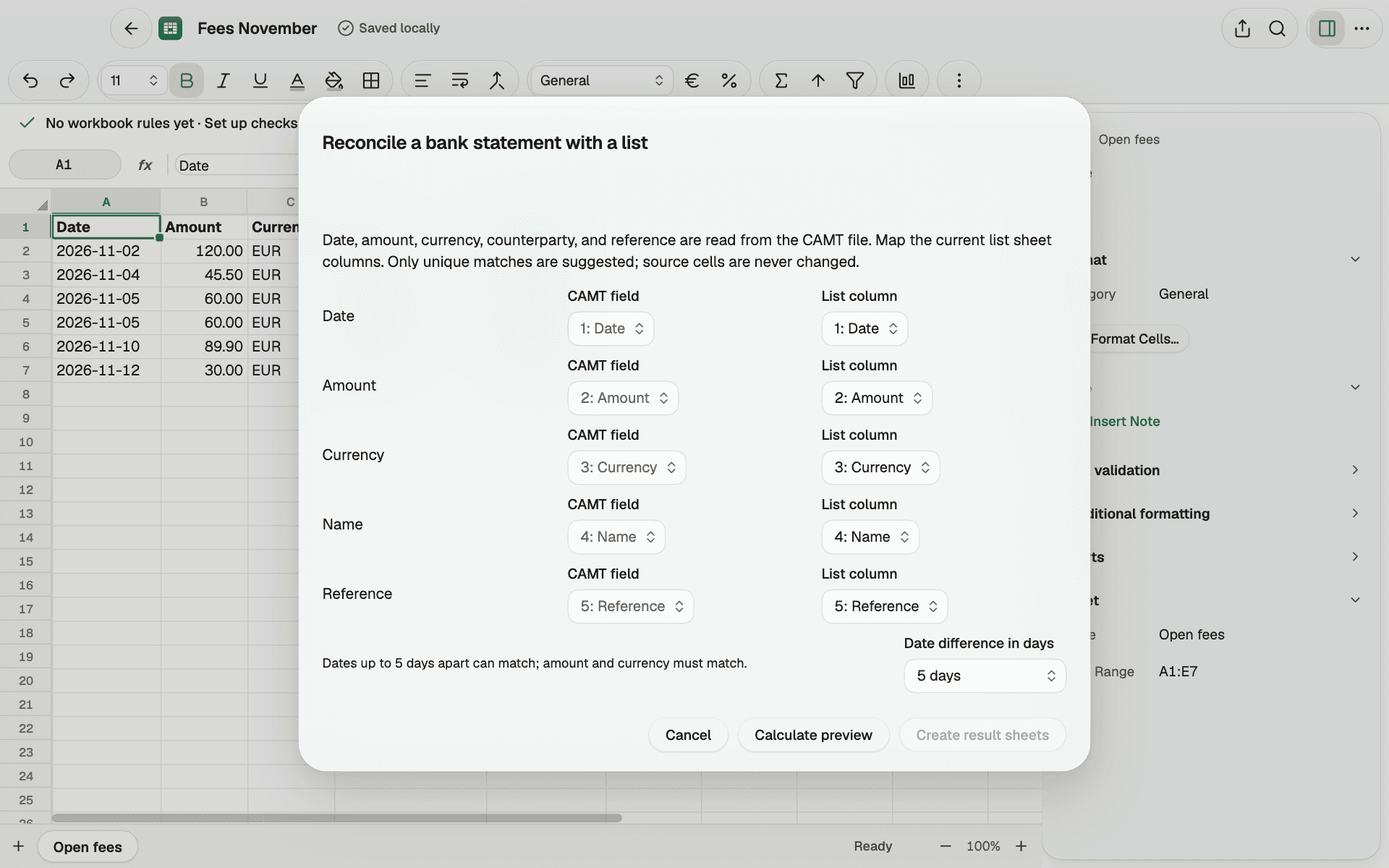
The list is an ordinary sheet with headings and five columns: date, amount, currency, name and reference. In the example, those are a club’s open membership fees for November. Reconcile bank statement in the Data menu asks for the file and then opens the Reconcile a bank statement with a list dialog.
With a CAMT file, the five bank fields are fixed and you only pick the matching columns of your list. With a CSV file, you map the bank columns too, and the first row counts as the header. Below that, you set how many days the booking date and list date may differ; the default is five days.
Up to this point, no cell changes. Calculate preview only calculates and writes nothing to the workbook either.
Read the preview and assign ambiguous lines
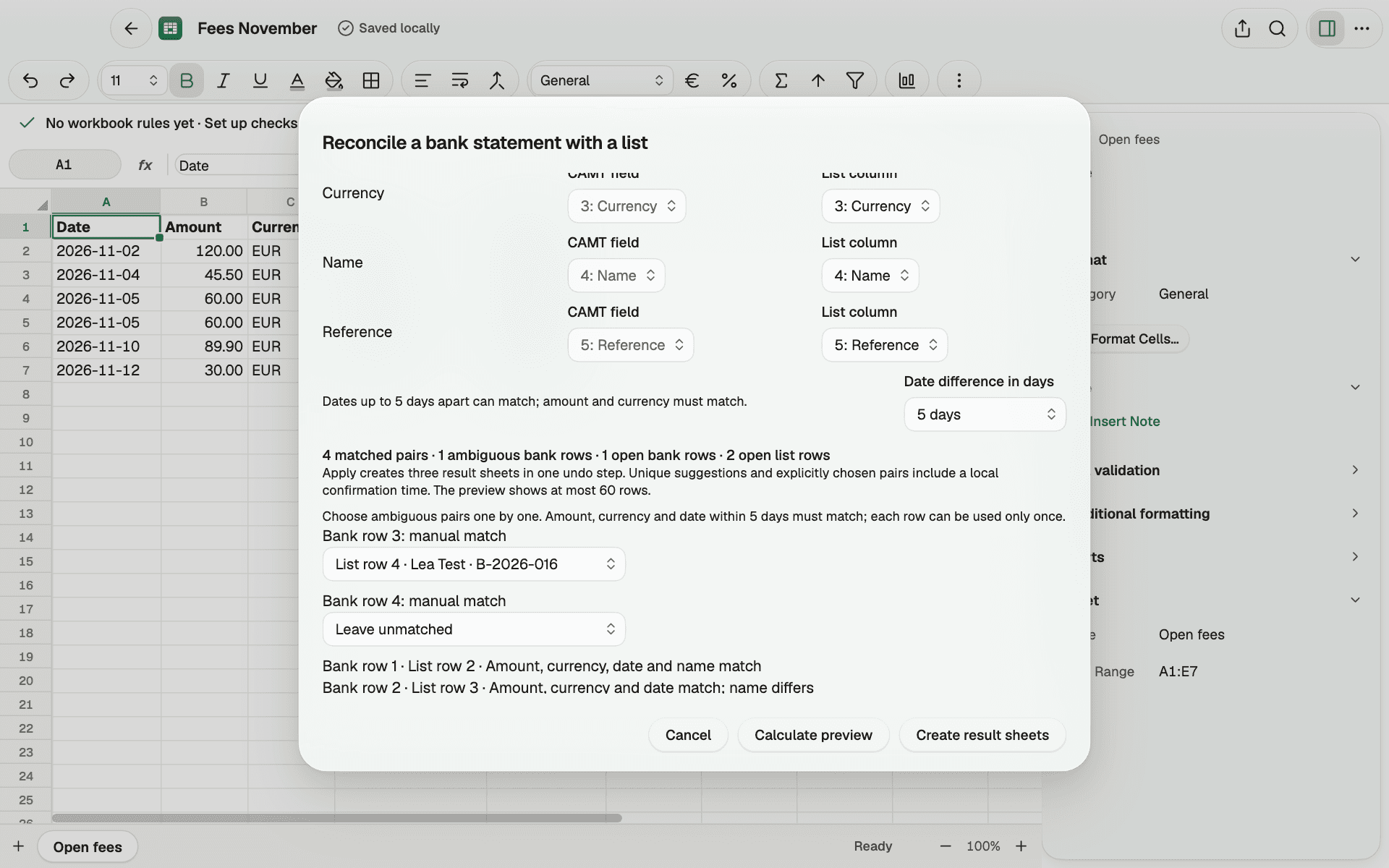
The preview counts matched pairs, ambiguous bank rows, open bank rows and open list rows. In the example, four payments match clearly, one of them despite a differently spelled name (“Amount, currency and date match; name differs”). A donation without a counterpart stays as an open bank row.
Two fees of 60.00 EUR on the same day can’t be matched automatically. For each such bank row there’s a manual match choice listing the free list rows that fit, or Leave unmatched. Once a list row is chosen, it’s no longer offered for other bank rows.
Create result sheets applies the preview. At most 60 preview rows are shown; any further rows still end up in the result sheets.
The result sheets
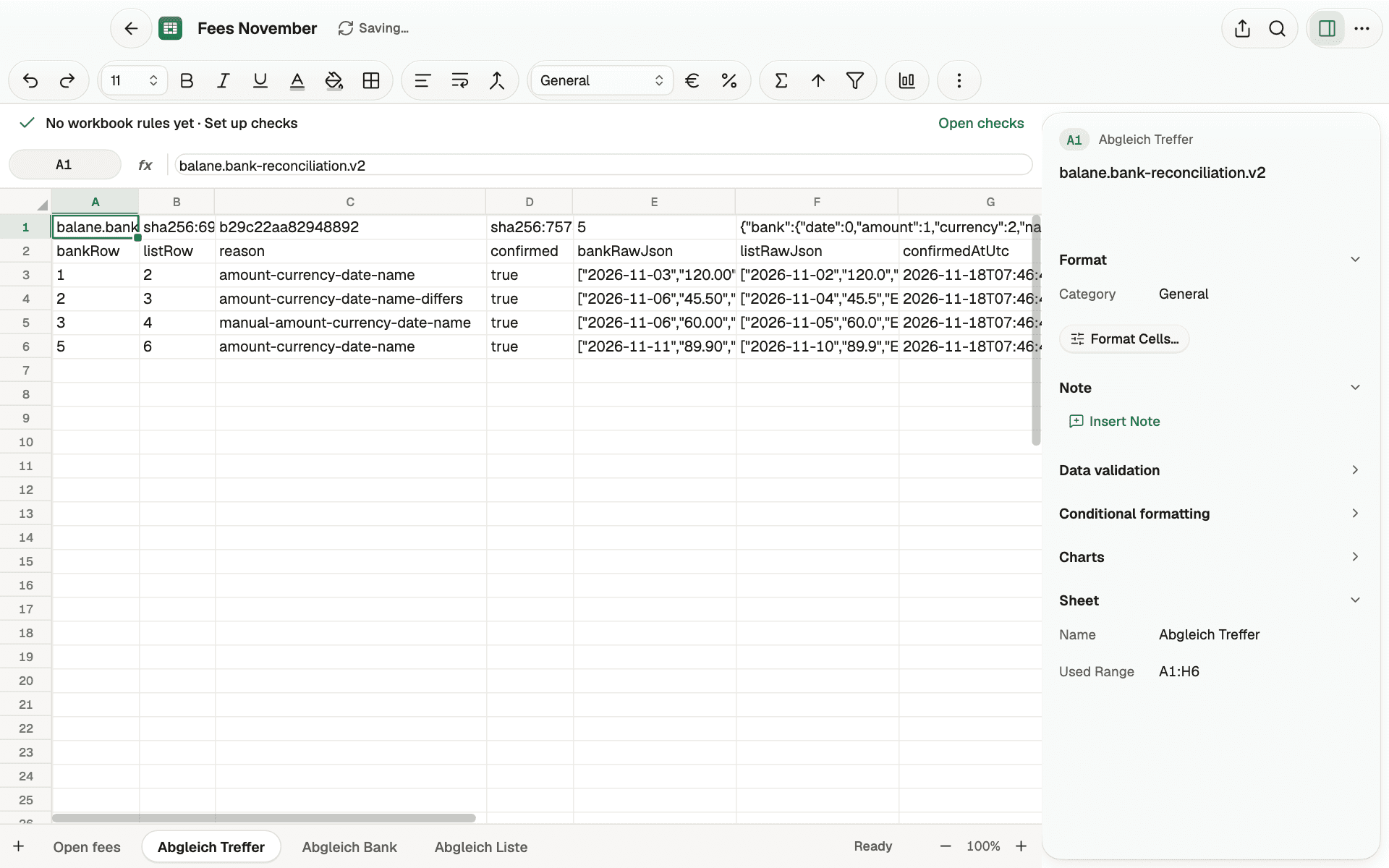
After applying, three new sheets appear in the workbook: “Abgleich Treffer” (matches), “Abgleich Bank” (open bank rows) and “Abgleich Liste” (open list rows). The names are German and fixed because the app reads them back later, for instance to detect a double import; they stay German in the English interface too.
Each match row records the original bank and list row, the reason for the match, whether it was automatic or manual, and when it was confirmed, plus the raw data of both sides. The sheet is more of an audit log than a polished overview.
A single undo removes all three sheets again. The source sheets stay unchanged either way. An applied decision can’t be changed individually, only through undo and a new reconciliation.
Common pitfalls
Dates in the list: the reconciliation reads the date as text in the format YYYY-MM-DD or DD.MM.YYYY. A cell that Sheets has recognised as a real date currently isn’t read as a date, according to the code; the row then counts as incomplete. That’s why the dates in the example are stored as text.
Batch bookings: a CAMT entry with several transactions is rejected because its total can’t be reliably assigned to a single counterparty. Unbooked entries and amounts in unsupported currencies appear as incomplete, never as a safe match.
Signs: credits are positive, debits negative. If you reconcile expenses, enter them with a minus sign in the list, or the amount won’t match.
How it works
Prepare your list
Open a sheet with headings and five columns: date (as text, YYYY-MM-DD or DD.MM.YYYY), amount, currency, name and reference.
Pick the statement
From the Data menu, choose Reconcile bank statement and select exactly one file, as CSV or CAMT.053 (XML).
Set columns and tolerance
Under List column, pick the matching columns (for CSV the bank columns too) and set the Date difference in days.
Calculate the preview
Calculate preview counts matches and open rows. Assign ambiguous bank rows through manual match, or Leave unmatched.
Apply and review
Choose Create result sheets and go through the three sheets. A single undo reverts everything.
At a glance
- CAMT versions
- .001.02, .001.04, .001.08
- Date tolerance
- 0–31 days, default 5
- Currencies
- EUR, USD, GBP, CHF, ZAR
- Size
- up to 10,000 rows per side, file up to 2 MiB
Limits
What the feature can’t do yet, or what hasn’t been tested.
- Built and tested, but not in a released version yet. A hands-on check with the native file picker is still pending. Reconciliation isn’t available in the browser.
- List dates must be stored as text (YYYY-MM-DD or DD.MM.YYYY); cells recognised as dates aren’t read, according to the code. This is derived from the code, not confirmed by a test.
- Batch entries with several transaction details are rejected. Not every CAMT variant and no bank-specific extensions are covered.
- Only five currencies with two decimal places; others stay open. You can assign the first 60 ambiguous bank lines by hand, each with up to 100 candidates.
- The result sheets have fixed German names and technical column keys. The result is a working aid, not bookkeeping and not a confirmation from your bank.
Frequently asked questions
What is a CAMT.053 file?
An electronic bank statement in XML format under ISO 20022 (the BankToCustomerStatement message). Many banks offer it for download in online banking.
Which CAMT version does my bank provide?
It’s in the namespace at the top of the file, such as camt.053.001.08. Sheets reads versions .001.02, .001.04 and .001.08 and reports others as unsupported.
Is my bank data uploaded anywhere?
No. Reconciliation runs on your device. The workbook stores a fingerprint of the file, not its path.
Does it work with a CSV file from my bank?
Yes. You map the columns for date, amount, currency, name and reference yourself; the first row counts as the header.
Why isn’t a payment matched even though the name is right?
What counts is amount, currency and date within the tolerance. If several list rows fit, the payment is ambiguous and waits for you to assign it. If the dates are further apart, a larger tolerance helps.
When will the feature be available?
It’s built and tested and ships with the next released version of Sheets. There’s no fixed date yet.
Balane Office is a long-running experiment: nine office apps, mostly built with AI. The apps are free and save to your own device. About the experiment →